> ## Documentation Index
> Fetch the complete documentation index at: https://docs.useautumn.com/llms.txt
> Use this file to discover all available pages before exploring further.
# Entity-level balances
> Grant usage limits per entity, such as 50 credits per user per month
Entities are a resource that lives under a parent customer, that can have it's own plans and feature balances.
Entity-level balances let you set usage limits that apply to each entity (like users, workspaces, or projects) individually. Instead of a single shared pool, each entity gets their own balance.
This is useful when you want to ensure fair usage across team members or isolate resource consumption per workspace.
## Example case
We have an AI meeting notes product with team-based pricing:
* **Team plan**: \$30 per seat per month
* **Each seat gets**: 50 meeting summaries per month
If a team has 8 users, they pay \$30 \times 8 = \$240/month, and each user gets their own 50 summaries.
## Configure Pricing
#### Create Features
Create two features:
1. **Seats** - A `metered` `non-consumable` feature to track team members
2. **Meeting Summaries** - A `metered` `consumable` feature for the number of meeting summaries generated
#### Create Team Plan
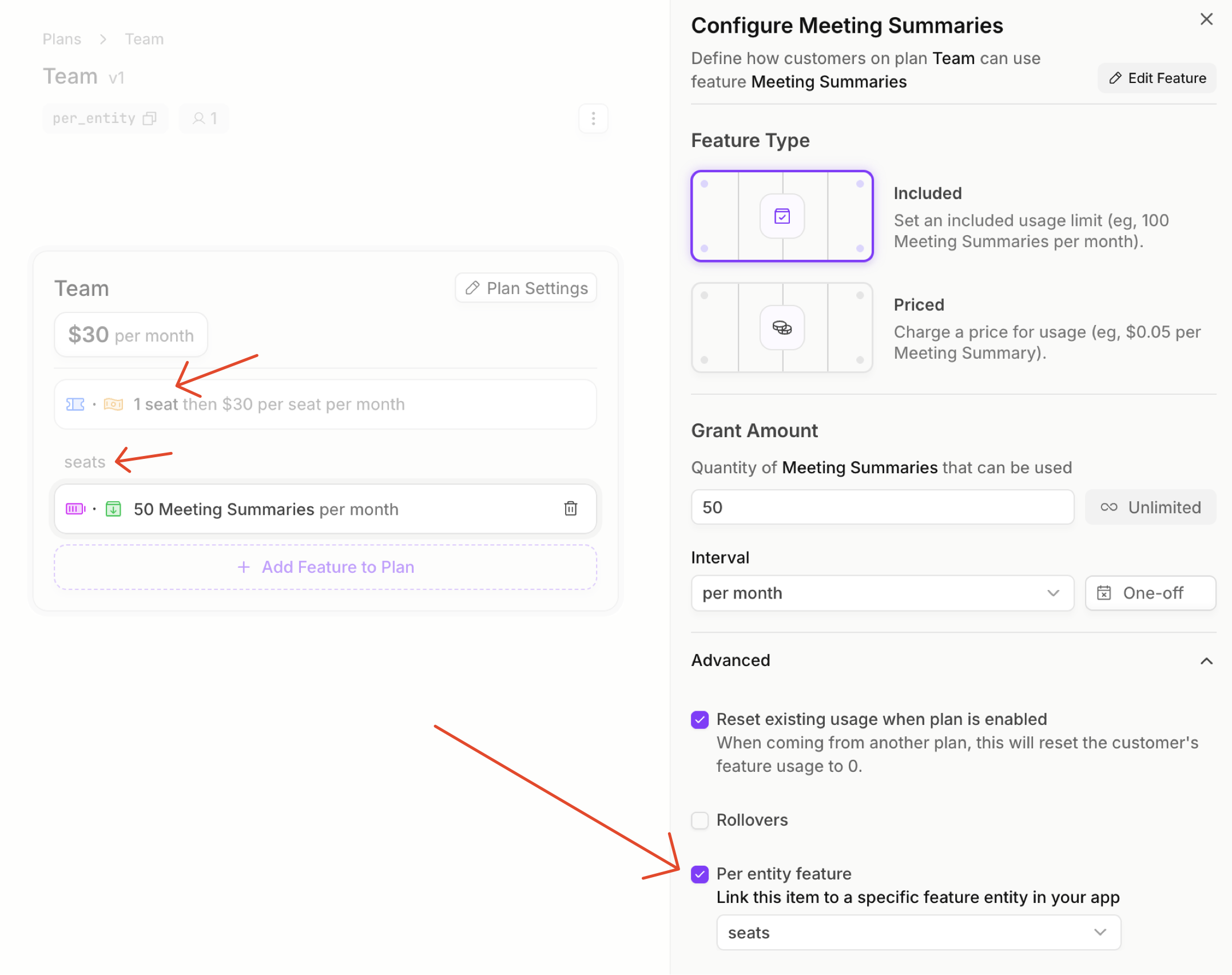
Create a Team plan with:
1. A **\$30/month base price**
2. **Seats**: 1 included, then \$30/seat for additional (usage-based)
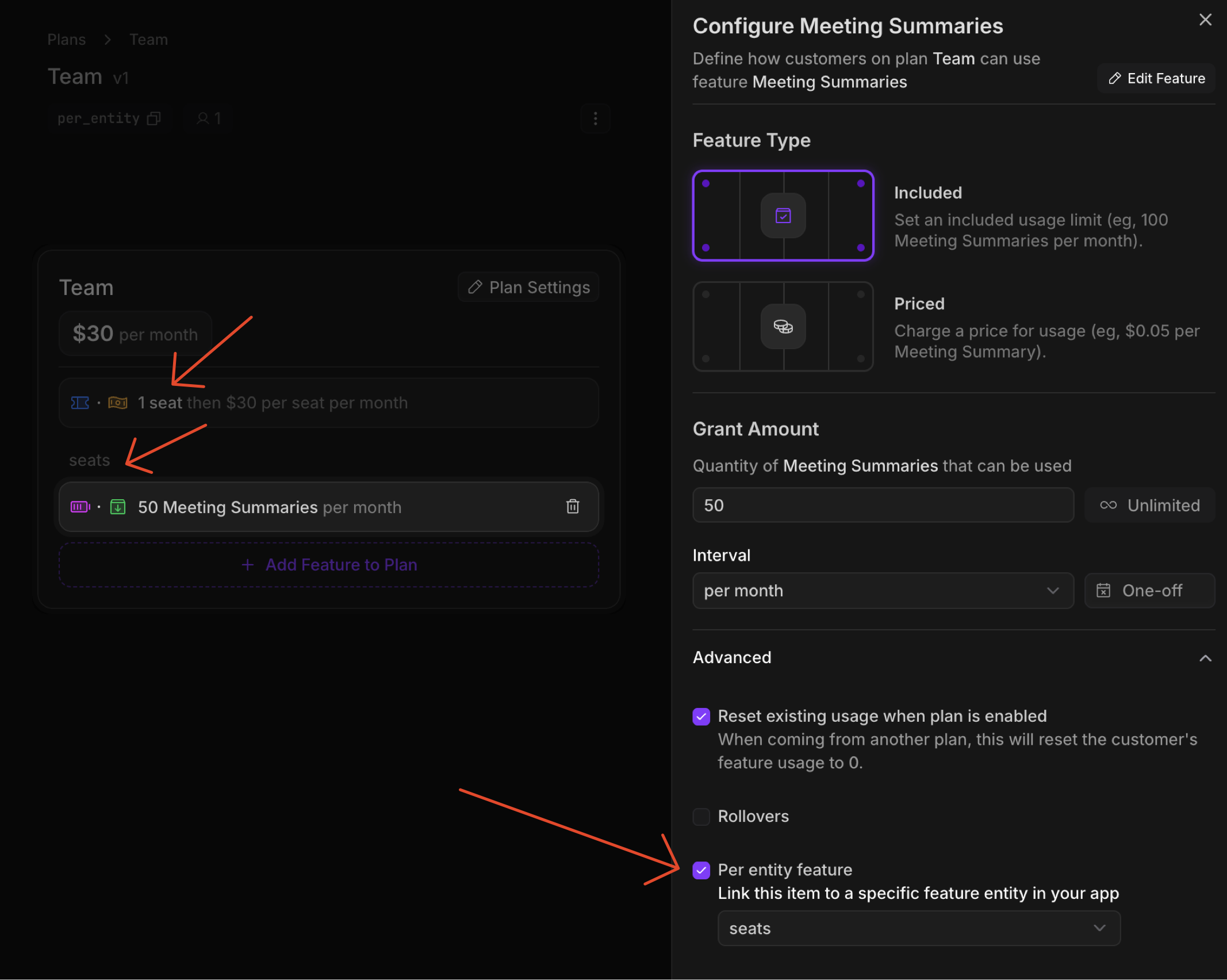
3. **Meeting Summaries**: 50 per month, linked to the Seats feature as a **per-entity feature**, under "Advanced"
The key configuration is setting the meeting summaries feature to point to "seats". When the entity is created, this creates a per-entity balance where each seat gets 50 summaries.
 ## Implementation
#### Create an Autumn Customer
When an organization signs up, create an Autumn customer.
```typescript Node.js theme={null}
import { Autumn } from "autumn-js";
const autumn = new Autumn({
secretKey: 'am_sk_42424242',
});
const { data, error } = await autumn.customers.create({
id: "org_123",
name: "Acme Corp",
email: "admin@acme.com",
});
```
```python Python theme={null}
import asyncio
from autumn import Autumn
autumn = Autumn('am_sk_42424242')
async def main():
customer = await autumn.customers.create(
id="org_123",
name="Acme Corp",
email="admin@acme.com",
)
asyncio.run(main())
```
```bash cURL theme={null}
curl --request POST \
--url https://api.useautumn.com/v1/customers \
--header 'Authorization: Bearer am_sk_42424242' \
--header 'Content-Type: application/json' \
--data '{
"id": "org_123",
"name": "Acme Corp",
"email": "admin@acme.com"
}'
```
#### Create Initial Entity
Create an entity for the admin user who is signing up. Since no plan is attached yet, this just registers the entity — no balance is granted yet. This should be done server-side for security.
```typescript Node.js theme={null}
import { Autumn } from "autumn-js";
const autumn = new Autumn({
secretKey: 'am_sk_42424242',
});
// Create entity for the initial admin user
await autumn.entities.create("org_123", {
id: "user_admin",
name: "Admin User",
feature_id: "seats",
});
```
```python Python theme={null}
import asyncio
from autumn import Autumn
autumn = Autumn("am_sk_42424242")
async def main():
# Create entity for the initial admin user
await autumn.features.create_entity(
customer_id="org_123",
id="user_admin",
name="Admin User",
feature_id="seats",
)
asyncio.run(main())
```
```bash cURL theme={null}
curl -X POST "https://api.useautumn.com/v1/customers/org_123/entities" \
-H "Authorization: Bearer am_sk_42424242" \
-H "Content-Type: application/json" \
-d '{
"id": "user_admin",
"name": "Admin User",
"feature_id": "seats"
}'
```
Since no plan is attached yet, this entity exists but has no balances. Once the Team plan is attached, this entity will automatically receive its 50 meeting summaries.
#### Attach the Team Plan
When the customer upgrades to Team, attach the plan. The checkout URL will show the \$30 base price.
```typescript Node.js theme={null}
import { Autumn } from "autumn-js";
const autumn = new Autumn({
secretKey: 'am_sk_42424242',
});
const { data } = await autumn.checkout({
customer_id: "org_123",
product_id: "team",
});
if (data.url) {
// Redirect to Stripe checkout
}
```
```python Python theme={null}
import asyncio
from autumn import Autumn
autumn = Autumn("am_sk_42424242")
async def main():
response = await autumn.checkout(
customer_id="org_123",
product_id="team",
)
if response.url:
# Redirect to Stripe checkout
pass
asyncio.run(main())
```
```bash cURL theme={null}
curl -X POST "https://api.useautumn.com/v1/checkout" \
-H "Authorization: Bearer am_sk_42424242" \
-H "Content-Type: application/json" \
-d '{
"customer_id": "org_123",
"product_id": "team"
}'
```
#### Create Entities (Seats)
When team members are added, create entities. This tracks seat usage and initializes their per-entity balance.
This will also bill the customer a prorated amount for the seat price. You can configure this proration behavior (full vs prorated, immediately vs next cycle) in the "Advanced" section of the plan feature when editing the plan.
```typescript Node.js theme={null}
import { Autumn } from "autumn-js";
const autumn = new Autumn({
secretKey: 'am_sk_42424242',
});
// Create entities for team members
await autumn.entities.create("org_123", [
{ id: "user_alice", name: "Alice Smith", feature_id: "seats" },
{ id: "user_bob", name: "Bob Jones", feature_id: "seats" },
{ id: "user_charlie", name: "Charlie Brown", feature_id: "seats" },
]);
```
```python Python theme={null}
import asyncio
from autumn import Autumn
autumn = Autumn("am_sk_42424242")
async def main():
# Create entities for team members
await autumn.features.create_entity(
customer_id="org_123",
id="user_alice",
name="Alice Smith",
feature_id="seats",
)
asyncio.run(main())
```
```bash cURL theme={null}
curl -X POST "https://api.useautumn.com/v1/customers/org_123/entities" \
-H "Authorization: Bearer am_sk_42424242" \
-H "Content-Type: application/json" \
-d '{
"id": "user_alice",
"name": "Alice Smith",
"feature_id": "seats"
}'
```
Creating an entity automatically increments the seat count. If you create 4 entities, your seat usage will be 4.
After you create an entity, navigate to the Autumn customer page, and you will see it created at the top of the page.
#### Check Access Per Entity
Before generating a meeting summary, check if that specific user has remaining balance.
```typescript Node.js theme={null}
import { Autumn } from "autumn-js";
const autumn = new Autumn({
secretKey: 'am_sk_42424242',
});
// Check Alice's individual balance
const { data } = await autumn.check({
customer_id: "org_123",
feature_id: "meeting_summaries",
entity_id: "user_alice",
});
if (!data.allowed) {
console.log("Alice has used all her meeting summaries");
} else {
console.log(`Alice has ${data.balance} summaries remaining`);
}
```
```python Python theme={null}
import asyncio
from autumn import Autumn
autumn = Autumn("am_sk_42424242")
async def main():
# Check Alice's individual balance
response = await autumn.check(
customer_id="org_123",
feature_id="meeting_summaries",
entity_id="user_alice",
)
if not response.allowed:
print("Alice has used all her meeting summaries")
else:
print(f"Alice has {response.balance} summaries remaining")
asyncio.run(main())
```
```bash cURL theme={null}
curl -X POST "https://api.useautumn.com/v1/check" \
-H "Authorization: Bearer am_sk_42424242" \
-H "Content-Type: application/json" \
-d '{
"customer_id": "org_123",
"feature_id": "meeting_summaries",
"entity_id": "user_alice"
}'
```
```json theme={null}
{
"allowed": true,
"customer_id": "org_123",
"feature_id": "meeting_summaries",
"entity_id": "user_alice",
"balance": 47,
"usage": 3,
"included_usage": 50,
"unlimited": false
}
```
#### Track Usage Per Entity
When a user generates a summary, track the usage against their entity.
```typescript Node.js theme={null}
import { Autumn } from "autumn-js";
const autumn = new Autumn({
secretKey: 'am_sk_42424242',
});
// Track usage for Alice
await autumn.track({
customer_id: "org_123",
feature_id: "meeting_summaries",
entity_id: "user_alice",
value: 1,
});
```
```python Python theme={null}
import asyncio
from autumn import Autumn
autumn = Autumn("am_sk_42424242")
async def main():
# Track usage for Alice
await autumn.track(
customer_id="org_123",
feature_id="meeting_summaries",
entity_id="user_alice",
value=1,
)
asyncio.run(main())
```
```bash cURL theme={null}
curl -X POST "https://api.useautumn.com/v1/track" \
-H "Authorization: Bearer am_sk_42424242" \
-H "Content-Type: application/json" \
-d '{
"customer_id": "org_123",
"feature_id": "meeting_summaries",
"entity_id": "user_alice",
"value": 1
}'
```
#### Check Customer-level Balance (Optional)
You can also check the total balance across all entities, useful for admin dashboards.
```typescript Node.js theme={null}
import { Autumn } from "autumn-js";
const autumn = new Autumn({
secretKey: 'am_sk_42424242',
});
// Check total balance across all users (omit entity_id)
const { data } = await autumn.check({
customer_id: "org_123",
feature_id: "meeting_summaries",
});
// With 3 users at 50 each = 150 total
console.log(`Team has ${data.balance} total summaries remaining`);
```
```python Python theme={null}
import asyncio
from autumn import Autumn
autumn = Autumn("am_sk_42424242")
async def main():
# Check total balance across all users
response = await autumn.check(
customer_id="org_123",
feature_id="meeting_summaries",
)
print(f"Team has {response.balance} total summaries remaining")
asyncio.run(main())
```
```bash cURL theme={null}
curl -X POST "https://api.useautumn.com/v1/check" \
-H "Authorization: Bearer am_sk_42424242" \
-H "Content-Type: application/json" \
-d '{
"customer_id": "org_123",
"feature_id": "meeting_summaries"
}'
```
```json theme={null}
{
"allowed": true,
"customer_id": "org_123",
"feature_id": "meeting_summaries",
"balance": 141,
"usage": 9,
"included_usage": 150,
"unlimited": false
}
```
The total is the sum of all entity balances (3 users × 50 = 150 included).
#### Remove Entities
When a team member leaves, delete their entity. This decrements seat usage and removes their balance.
It will also create a pro-rated refund for the seat price. You can configure this proration behavior in the "Advanced" section of the plan feature when editing the plan.
```typescript Node.js theme={null}
import { Autumn } from "autumn-js";
const autumn = new Autumn({
secretKey: 'am_sk_42424242',
});
// Remove Bob from the team
await autumn.entities.delete("org_123", "user_bob");
```
```python Python theme={null}
import asyncio
from autumn import Autumn
autumn = Autumn("am_sk_42424242")
async def main():
# Remove Bob from the team
await autumn.features.delete_entity("org_123", "user_bob")
asyncio.run(main())
```
```bash cURL theme={null}
curl -X DELETE "https://api.useautumn.com/v1/customers/org_123/entities/user_bob" \
-H "Authorization: Bearer am_sk_42424242"
```
Deleting an entity automatically decrements the seat count. The customer's total meeting summary balance will also decrease accordingly.
## Summary
| Level | Check/Track With | Use Case |
| ------------------ | ------------------------- | ----------------------------------- |
| **Entity-level** | `entity_id: "user_alice"` | Individual user limits, fair usage |
| **Customer-level** | No `entity_id` | Admin dashboards, total consumption |
Entity-level balances are ideal when you want to:
* Ensure fair usage across team members
* Isolate consumption per workspace or project
* Bill per-entity while providing entity-specific limits
## Implementation
#### Create an Autumn Customer
When an organization signs up, create an Autumn customer.
```typescript Node.js theme={null}
import { Autumn } from "autumn-js";
const autumn = new Autumn({
secretKey: 'am_sk_42424242',
});
const { data, error } = await autumn.customers.create({
id: "org_123",
name: "Acme Corp",
email: "admin@acme.com",
});
```
```python Python theme={null}
import asyncio
from autumn import Autumn
autumn = Autumn('am_sk_42424242')
async def main():
customer = await autumn.customers.create(
id="org_123",
name="Acme Corp",
email="admin@acme.com",
)
asyncio.run(main())
```
```bash cURL theme={null}
curl --request POST \
--url https://api.useautumn.com/v1/customers \
--header 'Authorization: Bearer am_sk_42424242' \
--header 'Content-Type: application/json' \
--data '{
"id": "org_123",
"name": "Acme Corp",
"email": "admin@acme.com"
}'
```
#### Create Initial Entity
Create an entity for the admin user who is signing up. Since no plan is attached yet, this just registers the entity — no balance is granted yet. This should be done server-side for security.
```typescript Node.js theme={null}
import { Autumn } from "autumn-js";
const autumn = new Autumn({
secretKey: 'am_sk_42424242',
});
// Create entity for the initial admin user
await autumn.entities.create("org_123", {
id: "user_admin",
name: "Admin User",
feature_id: "seats",
});
```
```python Python theme={null}
import asyncio
from autumn import Autumn
autumn = Autumn("am_sk_42424242")
async def main():
# Create entity for the initial admin user
await autumn.features.create_entity(
customer_id="org_123",
id="user_admin",
name="Admin User",
feature_id="seats",
)
asyncio.run(main())
```
```bash cURL theme={null}
curl -X POST "https://api.useautumn.com/v1/customers/org_123/entities" \
-H "Authorization: Bearer am_sk_42424242" \
-H "Content-Type: application/json" \
-d '{
"id": "user_admin",
"name": "Admin User",
"feature_id": "seats"
}'
```
Since no plan is attached yet, this entity exists but has no balances. Once the Team plan is attached, this entity will automatically receive its 50 meeting summaries.
#### Attach the Team Plan
When the customer upgrades to Team, attach the plan. The checkout URL will show the \$30 base price.
```typescript Node.js theme={null}
import { Autumn } from "autumn-js";
const autumn = new Autumn({
secretKey: 'am_sk_42424242',
});
const { data } = await autumn.checkout({
customer_id: "org_123",
product_id: "team",
});
if (data.url) {
// Redirect to Stripe checkout
}
```
```python Python theme={null}
import asyncio
from autumn import Autumn
autumn = Autumn("am_sk_42424242")
async def main():
response = await autumn.checkout(
customer_id="org_123",
product_id="team",
)
if response.url:
# Redirect to Stripe checkout
pass
asyncio.run(main())
```
```bash cURL theme={null}
curl -X POST "https://api.useautumn.com/v1/checkout" \
-H "Authorization: Bearer am_sk_42424242" \
-H "Content-Type: application/json" \
-d '{
"customer_id": "org_123",
"product_id": "team"
}'
```
#### Create Entities (Seats)
When team members are added, create entities. This tracks seat usage and initializes their per-entity balance.
This will also bill the customer a prorated amount for the seat price. You can configure this proration behavior (full vs prorated, immediately vs next cycle) in the "Advanced" section of the plan feature when editing the plan.
```typescript Node.js theme={null}
import { Autumn } from "autumn-js";
const autumn = new Autumn({
secretKey: 'am_sk_42424242',
});
// Create entities for team members
await autumn.entities.create("org_123", [
{ id: "user_alice", name: "Alice Smith", feature_id: "seats" },
{ id: "user_bob", name: "Bob Jones", feature_id: "seats" },
{ id: "user_charlie", name: "Charlie Brown", feature_id: "seats" },
]);
```
```python Python theme={null}
import asyncio
from autumn import Autumn
autumn = Autumn("am_sk_42424242")
async def main():
# Create entities for team members
await autumn.features.create_entity(
customer_id="org_123",
id="user_alice",
name="Alice Smith",
feature_id="seats",
)
asyncio.run(main())
```
```bash cURL theme={null}
curl -X POST "https://api.useautumn.com/v1/customers/org_123/entities" \
-H "Authorization: Bearer am_sk_42424242" \
-H "Content-Type: application/json" \
-d '{
"id": "user_alice",
"name": "Alice Smith",
"feature_id": "seats"
}'
```
Creating an entity automatically increments the seat count. If you create 4 entities, your seat usage will be 4.
After you create an entity, navigate to the Autumn customer page, and you will see it created at the top of the page.
#### Check Access Per Entity
Before generating a meeting summary, check if that specific user has remaining balance.
```typescript Node.js theme={null}
import { Autumn } from "autumn-js";
const autumn = new Autumn({
secretKey: 'am_sk_42424242',
});
// Check Alice's individual balance
const { data } = await autumn.check({
customer_id: "org_123",
feature_id: "meeting_summaries",
entity_id: "user_alice",
});
if (!data.allowed) {
console.log("Alice has used all her meeting summaries");
} else {
console.log(`Alice has ${data.balance} summaries remaining`);
}
```
```python Python theme={null}
import asyncio
from autumn import Autumn
autumn = Autumn("am_sk_42424242")
async def main():
# Check Alice's individual balance
response = await autumn.check(
customer_id="org_123",
feature_id="meeting_summaries",
entity_id="user_alice",
)
if not response.allowed:
print("Alice has used all her meeting summaries")
else:
print(f"Alice has {response.balance} summaries remaining")
asyncio.run(main())
```
```bash cURL theme={null}
curl -X POST "https://api.useautumn.com/v1/check" \
-H "Authorization: Bearer am_sk_42424242" \
-H "Content-Type: application/json" \
-d '{
"customer_id": "org_123",
"feature_id": "meeting_summaries",
"entity_id": "user_alice"
}'
```
```json theme={null}
{
"allowed": true,
"customer_id": "org_123",
"feature_id": "meeting_summaries",
"entity_id": "user_alice",
"balance": 47,
"usage": 3,
"included_usage": 50,
"unlimited": false
}
```
#### Track Usage Per Entity
When a user generates a summary, track the usage against their entity.
```typescript Node.js theme={null}
import { Autumn } from "autumn-js";
const autumn = new Autumn({
secretKey: 'am_sk_42424242',
});
// Track usage for Alice
await autumn.track({
customer_id: "org_123",
feature_id: "meeting_summaries",
entity_id: "user_alice",
value: 1,
});
```
```python Python theme={null}
import asyncio
from autumn import Autumn
autumn = Autumn("am_sk_42424242")
async def main():
# Track usage for Alice
await autumn.track(
customer_id="org_123",
feature_id="meeting_summaries",
entity_id="user_alice",
value=1,
)
asyncio.run(main())
```
```bash cURL theme={null}
curl -X POST "https://api.useautumn.com/v1/track" \
-H "Authorization: Bearer am_sk_42424242" \
-H "Content-Type: application/json" \
-d '{
"customer_id": "org_123",
"feature_id": "meeting_summaries",
"entity_id": "user_alice",
"value": 1
}'
```
#### Check Customer-level Balance (Optional)
You can also check the total balance across all entities, useful for admin dashboards.
```typescript Node.js theme={null}
import { Autumn } from "autumn-js";
const autumn = new Autumn({
secretKey: 'am_sk_42424242',
});
// Check total balance across all users (omit entity_id)
const { data } = await autumn.check({
customer_id: "org_123",
feature_id: "meeting_summaries",
});
// With 3 users at 50 each = 150 total
console.log(`Team has ${data.balance} total summaries remaining`);
```
```python Python theme={null}
import asyncio
from autumn import Autumn
autumn = Autumn("am_sk_42424242")
async def main():
# Check total balance across all users
response = await autumn.check(
customer_id="org_123",
feature_id="meeting_summaries",
)
print(f"Team has {response.balance} total summaries remaining")
asyncio.run(main())
```
```bash cURL theme={null}
curl -X POST "https://api.useautumn.com/v1/check" \
-H "Authorization: Bearer am_sk_42424242" \
-H "Content-Type: application/json" \
-d '{
"customer_id": "org_123",
"feature_id": "meeting_summaries"
}'
```
```json theme={null}
{
"allowed": true,
"customer_id": "org_123",
"feature_id": "meeting_summaries",
"balance": 141,
"usage": 9,
"included_usage": 150,
"unlimited": false
}
```
The total is the sum of all entity balances (3 users × 50 = 150 included).
#### Remove Entities
When a team member leaves, delete their entity. This decrements seat usage and removes their balance.
It will also create a pro-rated refund for the seat price. You can configure this proration behavior in the "Advanced" section of the plan feature when editing the plan.
```typescript Node.js theme={null}
import { Autumn } from "autumn-js";
const autumn = new Autumn({
secretKey: 'am_sk_42424242',
});
// Remove Bob from the team
await autumn.entities.delete("org_123", "user_bob");
```
```python Python theme={null}
import asyncio
from autumn import Autumn
autumn = Autumn("am_sk_42424242")
async def main():
# Remove Bob from the team
await autumn.features.delete_entity("org_123", "user_bob")
asyncio.run(main())
```
```bash cURL theme={null}
curl -X DELETE "https://api.useautumn.com/v1/customers/org_123/entities/user_bob" \
-H "Authorization: Bearer am_sk_42424242"
```
Deleting an entity automatically decrements the seat count. The customer's total meeting summary balance will also decrease accordingly.
## Summary
| Level | Check/Track With | Use Case |
| ------------------ | ------------------------- | ----------------------------------- |
| **Entity-level** | `entity_id: "user_alice"` | Individual user limits, fair usage |
| **Customer-level** | No `entity_id` | Admin dashboards, total consumption |
Entity-level balances are ideal when you want to:
* Ensure fair usage across team members
* Isolate consumption per workspace or project
* Bill per-entity while providing entity-specific limits