> ## Documentation Index
> Fetch the complete documentation index at: https://docs.useautumn.com/llms.txt
> Use this file to discover all available pages before exploring further.

# One-time top ups

> Let customers purchase a prepaid package to top up their balance when it falls low.

If a user hits a usage limit you granted them, they may be willing to purchase a top-up.

These are typically one-time purchases (but can also be recurring add-ons) that grant a fixed usage of a feature.

This gives users full spend control and allows your business to be paid upfront. For these reasons, it tends to be a more popular alternative to usage-based pricing -- eg, OpenAI uses this model for their API.

## Example case

In this example, we have an AI chatbot that offers:

* 10 messages per month for free
* An option for customers to top-up messages in packages of \$10 per 100 messages.

## Configure Pricing

<Steps>
  <Step>
    #### Create Features

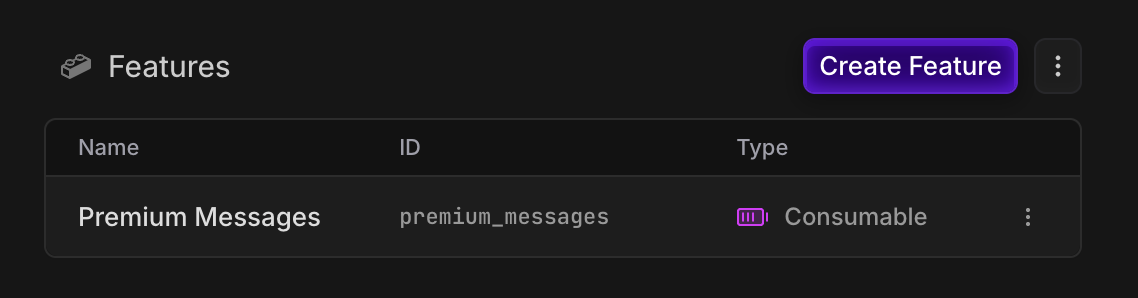
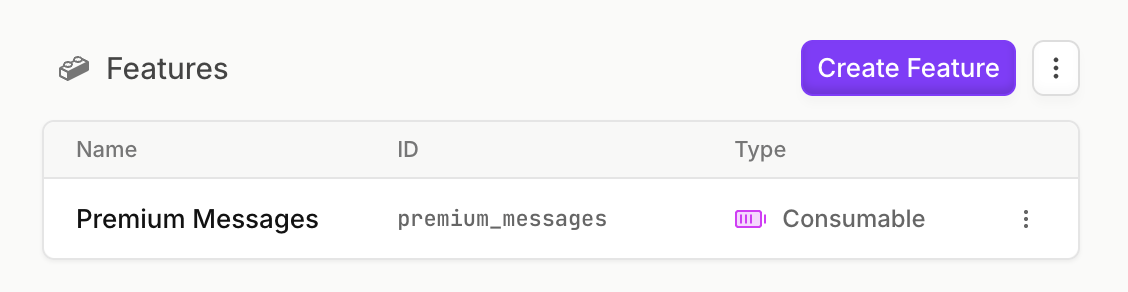
    Create a `metered` `consumable` feature for our messages, so we can track their balance.

    <Frame>
      <img src="https://mintcdn.com/autumn-b9b4c0fb/df8oGyhsA_ngL7c4/assets/guides/prepaid/features-light.png?fit=max&auto=format&n=df8oGyhsA_ngL7c4&q=85&s=63176075558253d33ac4705cdffe41d1" className="block dark:hidden" width="1128" height="292" data-path="assets/guides/prepaid/features-light.png" />

      <img src="https://mintcdn.com/autumn-b9b4c0fb/df8oGyhsA_ngL7c4/assets/guides/prepaid/features-dark.png?fit=max&auto=format&n=df8oGyhsA_ngL7c4&q=85&s=bc10f2b04211094f5cb42904524d1940" className="hidden dark:block" width="1138" height="298" data-path="assets/guides/prepaid/features-dark.png" />
    </Frame>
  </Step>

  <Step>
    #### Create Free and Top-up Plans

    **Free Plan** <br />
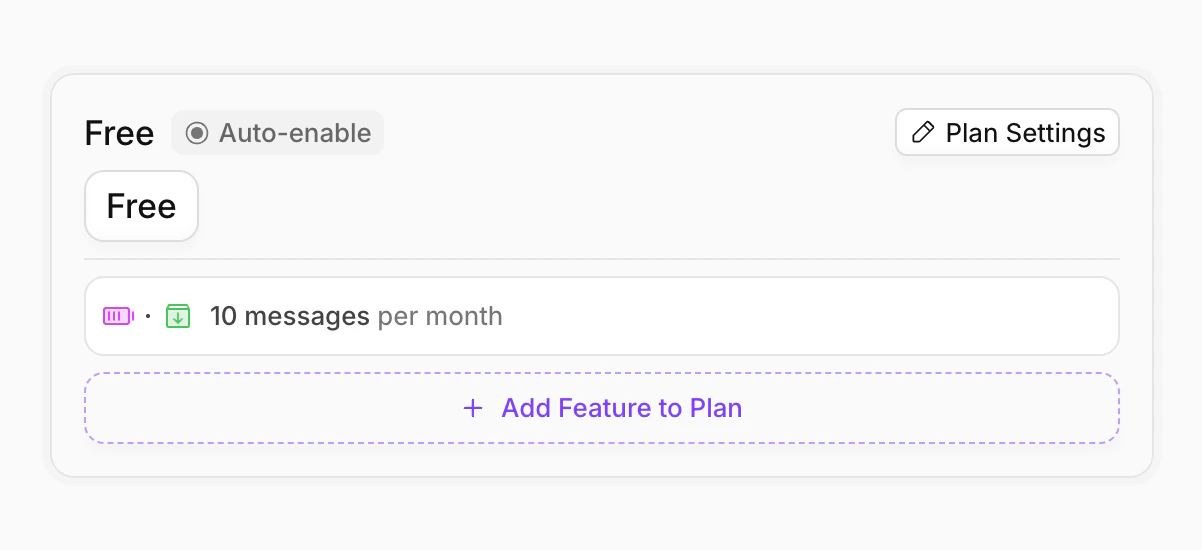
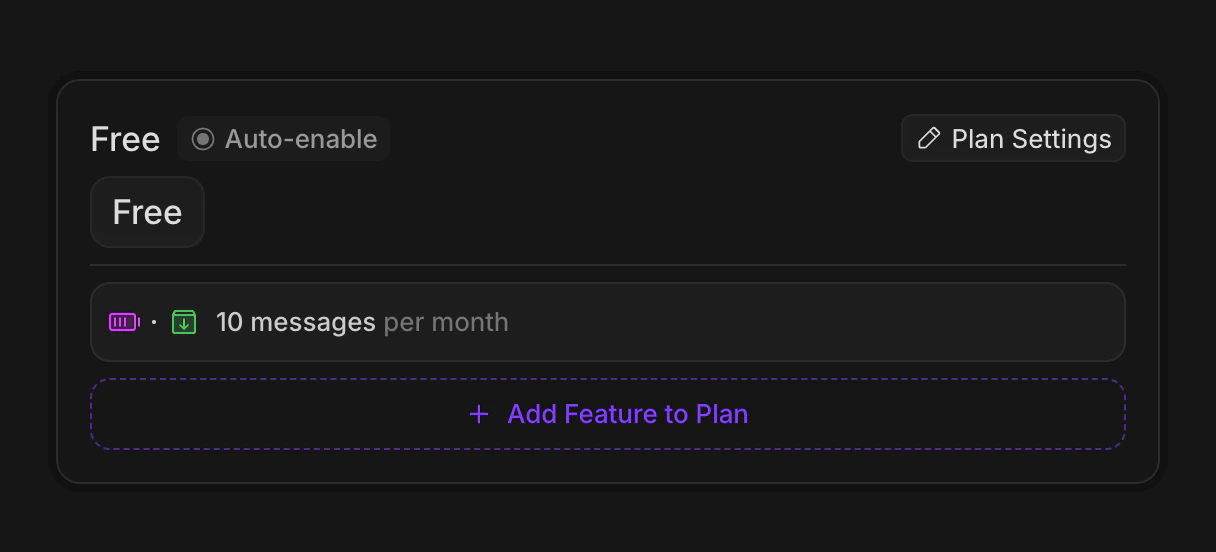
    Create a free plan, and assign 10 messages to it. We'll add an interval of "month", so that the user is granted 10 periodically.

    <Tip>
      Make sure to set the `auto-enable` flag on the free plan, so that it is automatically assigned to new customers.
    </Tip>

    <Frame>
      <img src="https://mintcdn.com/autumn-b9b4c0fb/N2gnPAz99EkSlUzD/assets/guides/prepaid/free-light.png?fit=max&auto=format&n=N2gnPAz99EkSlUzD&q=85&s=ceb6a54f81e7d720aea51ef4c07fc200" className="block dark:hidden" width="1202" height="550" data-path="assets/guides/prepaid/free-light.png" />

      <img src="https://mintcdn.com/autumn-b9b4c0fb/N2gnPAz99EkSlUzD/assets/guides/prepaid/free-dark.png?fit=max&auto=format&n=N2gnPAz99EkSlUzD&q=85&s=661183db8e791022f2ad72565ea0847f" className="hidden dark:block" width="1216" height="552" data-path="assets/guides/prepaid/free-dark.png" />
    </Frame>

    **Top up Plan** <br />
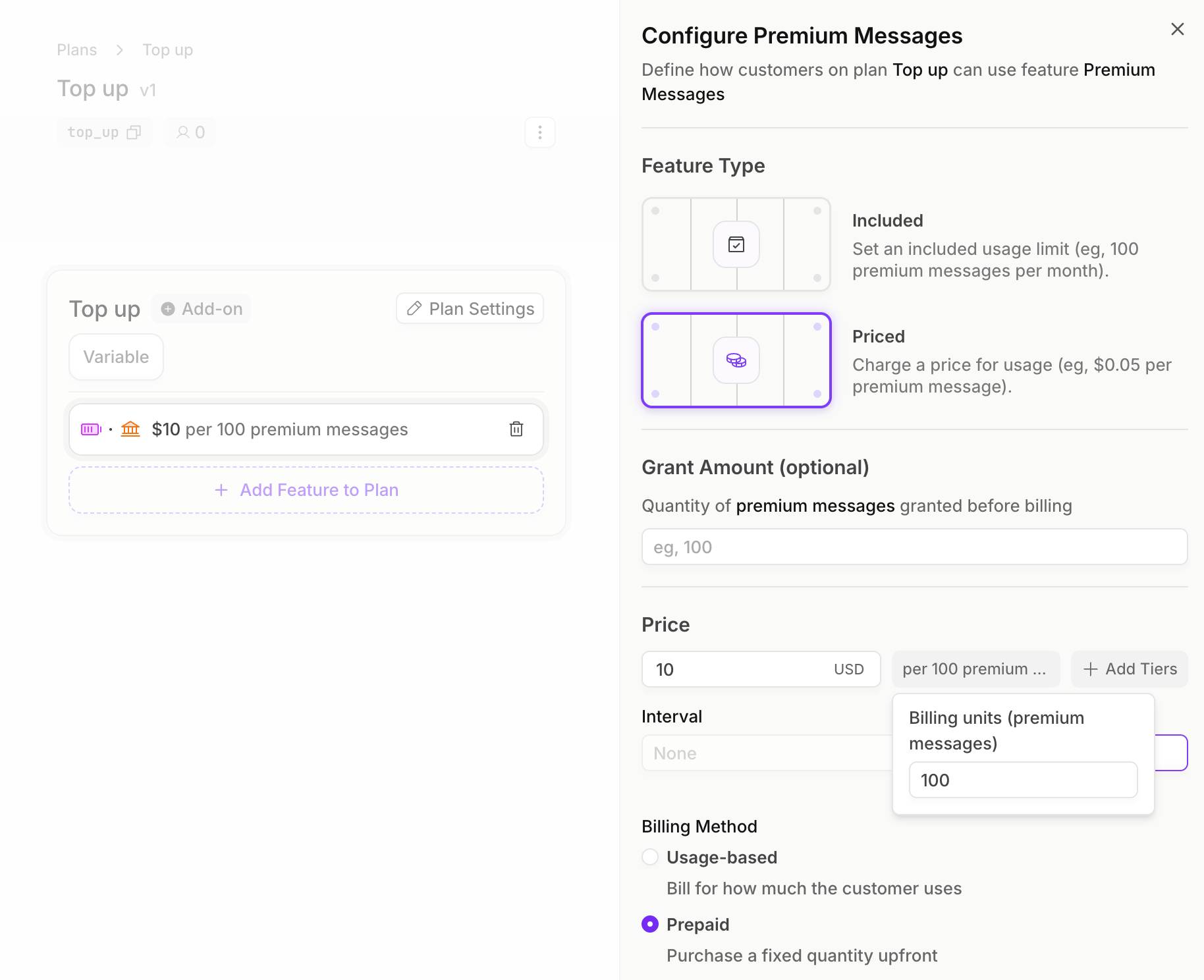
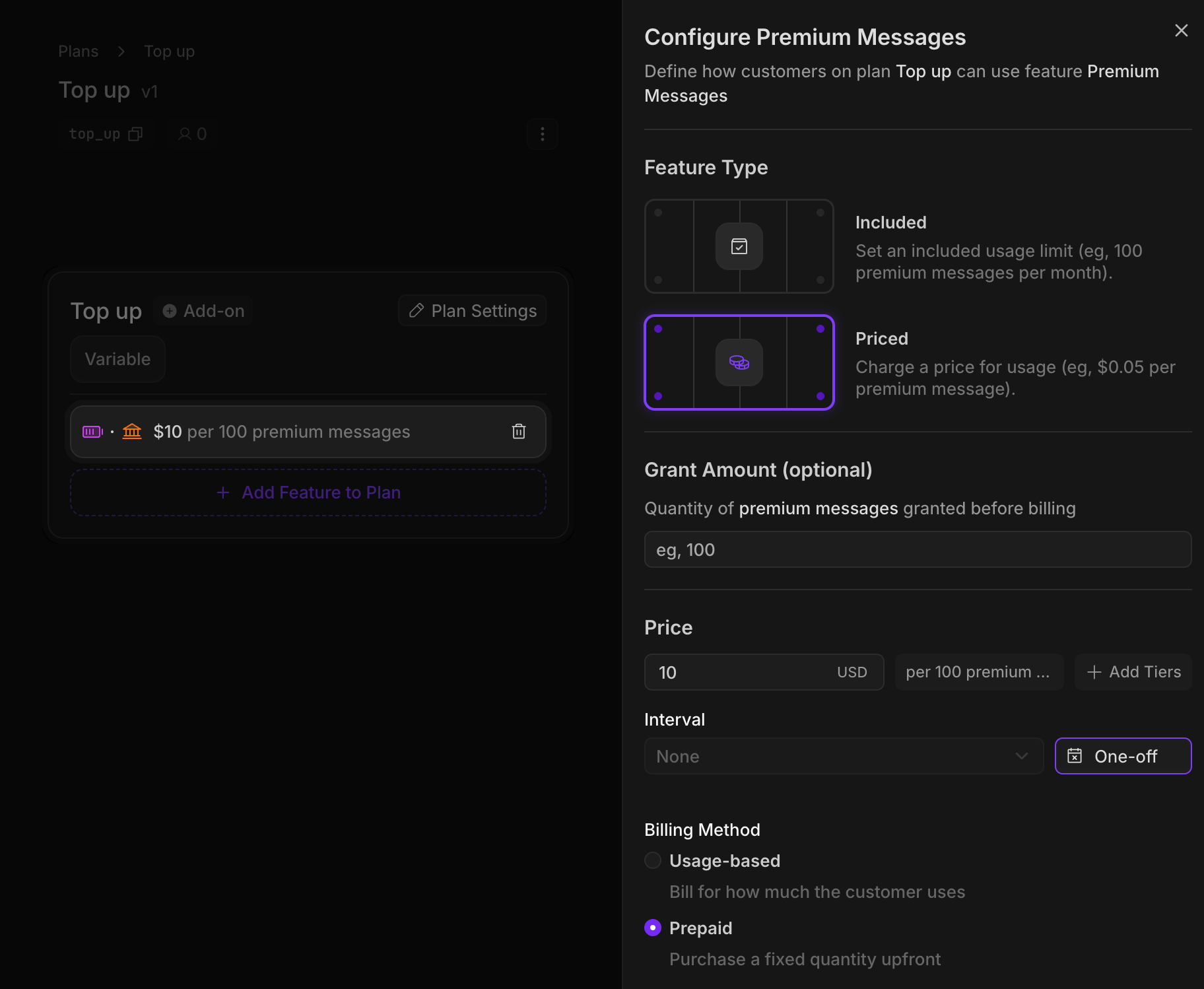
    Now we'll create our top-up plan. Again, we'll assign the messages feature, but this time with a `prepaid` price of \$10 per 100 messages.

    Since these messages have interval "one-off", the messages will last forever (unlike our Free plan messages, which reset every month).

    Features with a `prepaid` price require a `quantity` to be passed in when a customer purchases the plan, so the customer can specify how many messages they want to top up with.

    <Frame>
      <img src="https://mintcdn.com/autumn-b9b4c0fb/df8oGyhsA_ngL7c4/assets/guides/prepaid/topup-light.png?fit=max&auto=format&n=df8oGyhsA_ngL7c4&q=85&s=72fc1f7115909681f8de82a70240e41d" className="block dark:hidden" width="1828" height="1488" data-path="assets/guides/prepaid/topup-light.png" />

      <img src="https://mintcdn.com/autumn-b9b4c0fb/df8oGyhsA_ngL7c4/assets/guides/prepaid/topup-dark.png?fit=max&auto=format&n=df8oGyhsA_ngL7c4&q=85&s=65d44a730411b8de113a615ed3dd4a32" className="hidden dark:block" width="1824" height="1498" data-path="assets/guides/prepaid/topup-dark.png" />
    </Frame>
  </Step>
</Steps>

## Implementation

<Steps>
  <Step>
    #### Create an Autumn Customer

    When your user signs up, create an Autumn customer. This will automatically assign them the Free plan, and grant them the 10 monthly messages.

    <CodeGroup>
      ```jsx React theme={null}
      import { useCustomer } from "autumn-js/react";

      const App = () => {
        const { customer } = useCustomer();

        console.log("Autumn customer:", customer);

        return <h1>Welcome, {customer?.name || "user"}!</h1>;
      };
      ```

      ```typescript Node.js theme={null}
      import { Autumn } from "autumn-js";

      const autumn = new Autumn({
        secretKey: 'am_sk_42424242',
      });

      const { data, error } = await autumn.customers.create({
        id: "user_or_org_id_from_auth",
        name: "John Yeo",
        email: "john@example.com",
      });
      ```

      ```python Python theme={null}
      import asyncio
      from autumn import Autumn

      autumn = Autumn('am_sk_42424242')

      async def main():
          customer = await autumn.customers.create(
              id="user_or_org_id_from_auth",
              name="John Yeo",
              email="john@example.com",
          )

      asyncio.run(main())
      ```

      ```bash cURL theme={null}
      curl --request POST \
        --url https://api.useautumn.com/customers \
        --header 'Authorization: Bearer am_sk_42424242' \
        --header 'Content-Type: application/json' \
        --data '{
          "id": "user_or_org_id_from_auth",
          "name": "John Yeo",
          "email": "john@example.com"
        }'
      ```
    </CodeGroup>
  </Step>

  <Step>
    #### Checking for access

    Before our user sends a message, we'll first check if they have a balance of messages remaining.

    <CodeGroup>
      ```jsx React wrap theme={null}
      import { useCustomer } from "autumn-js/react";

      export function CheckPremiumMessage() {
        const { check, refetch } = useCustomer();

        const handleCheckAccess = async () => {
          const { data } = await check({ featureId: "messages" });

          if (!data?.allowed) {
            alert("You've run out of messages");
          } else {
            // proceed with sending message
            await refetch();
          }
        };
      }
      ```

      ```typescript Node.js theme={null}
      import { Autumn } from "autumn-js";

      const autumn = new Autumn({
        secretKey: 'am_sk_42424242',
      });

      const { data } = await autumn.check({
        customer_id: "user_or_org_id_from_auth",
        feature_id: "messages",
      });

      if (!data.allowed) {
        console.log("User has run out of messages");
        return;
      }
      ```

      ```python Python theme={null}
      import asyncio
      from autumn import Autumn

      autumn = Autumn("am_sk_1234567890")

      async def main():
          response = await autumn.check(
              customer_id="user_or_org_id_from_auth",
              feature_id="messages",
          )
          
          if not response.allowed:
              print("User has run out of messages")
              return

      asyncio.run(main())
      ```

      ```bash cURL theme={null}
      curl -X POST "https://api.useautumn.com/v1/check" \
        -H "Authorization: Bearer am_sk_1234567890" \
        -H "Content-Type: application/json" \
        -d '{
          "customer_id": "user_or_org_id_from_auth",
          "feature_id": "messages"
        }'
      ```
    </CodeGroup>

    <Expandable title="check response">
      ```json theme={null}
      {
        "customer_id": "user_or_org_id_from_auth",
        "feature_id": "messages",
        "code": "feature_found",
        "allowed": true,
        "balance": 10,
        "usage": 0,
        "included_usage": 10,
        "unlimited": false,
        "interval": null,
        "interval_count": 1,
        "next_reset_at": 2803498203,
        "overage_allowed": false
      }
      ```
    </Expandable>
  </Step>

  <Step>
    #### Tracking messages used

    After the user has used a message, record it in Autumn to decrease their remaining balance. In this example, the user used 5 messages.

    <CodeGroup>
      ```typescript Node.js theme={null}
      import { Autumn } from "autumn-js";

      const autumn = new Autumn({
        secretKey: 'am_sk_42424242',
      });

      await autumn.track({
        customer_id: "user_or_org_id_from_auth",
        feature_id: "messages",
        value: 5,
      });
      ```

      ```python Python theme={null}
      import asyncio
      from autumn import Autumn

      autumn = Autumn("am_sk_42424242")

      async def main():
          await autumn.track(
              customer_id="user_or_org_id_from_auth",
              feature_id="messages",
              value=5,
          )

      asyncio.run(main())
      ```

      ```bash cURL theme={null}
      curl -X POST "https://api.useautumn.com/v1/track" \
        -H "Authorization: Bearer am_sk_42424242" \
        -H "Content-Type: application/json" \
        -d '{
          "customer_id": "user_or_org_id_from_auth",
          "feature_id": "messages",
          "value": 5
        }'
      ```
    </CodeGroup>

    <Expandable title="track response">
      ```json theme={null}
      {
        "code": "event_received",
        "customer_id": "user_or_org_id_from_auth",
        "feature_id": "messages"
      }
      ```
    </Expandable>
  </Step>

  <Step>
    #### Purchasing top-ups

    When users run out of messages, they can purchase additional messages using our top-up plan. In this example, the user is purchasing 200 premium messages, which will cost them \$20.

    <CodeGroup>
      ```jsx React theme={null}
      import { useCustomer, CheckoutDialog } from "autumn-js/react";

      export default function TopUpButton() {
        const { checkout } = useCustomer();

        return (
          <button
            onClick={async () => {
              await checkout({
                productId: "top_up",
                dialog: CheckoutDialog,
                options: [{
                  featureId: "messages",
                  quantity: 200,
                }],
              });
            }}
          >
            Buy More Messages
          </button>
        );
      }
      ```

      ```typescript Node.js theme={null}
      import { Autumn } from "autumn-js";

      const autumn = new Autumn({
        secretKey: 'am_sk_42424242',
      });

      const { data } = await autumn.checkout({
        customer_id: "user_or_org_id_from_auth",
        product_id: "top_up",
        options: [{
          feature_id: "messages",
          quantity: 200,
        }],
      });

      if (data.url) {
        // Redirect user to Stripe checkout URL
      } else {
        // Show purchase preview to user
      }
      ```

      ```python Python theme={null}
      import asyncio
      from autumn import Autumn

      autumn = Autumn("am_sk_42424242")

      async def main():
          response = await autumn.checkout(
              customer_id="user_or_org_id_from_auth",
              product_id="top-up",
              options=[{
                "feature_id": "messages",
                "quantity": 200,
              }],
          )
          
          if response.url:
              # Redirect user to Stripe checkout URL
              pass
          else:
              # Show purchase preview to user
              pass

      asyncio.run(main())
      ```

      ```bash cURL theme={null}
      curl -X POST "https://api.useautumn.com/v1/checkout" \
        -H "Authorization: Bearer am_sk_42424242" \
        -H "Content-Type: application/json" \
        -d '{
          "customer_id": "user_or_org_id_from_auth",
          "product_id": "top-up",
          "options": [{
            "feature_id": "messages",
            "quantity": 200
          }]
        }'
      ```
    </CodeGroup>

    <Expandable title="checkout response">
      ```json theme={null}
      {
        "customer_id": "user_or_org_id_from_auth",
        "lines": [
          {
            "description": "Top-up - 200 premium messages",
            "amount": 20,
            "item": {
              "type": "feature",
              "feature_id": "premium-messages",
              "feature_type": "prepaid",
              "feature": {
                "id": "premium-messages",
                "name": "Premium messages",
                "type": "metered",
                "display": {
                  "singular": "premium message",
                  "plural": "premium messages"
                }
              },
              "quantity": 200,
              "price": 10,
              "price_per": 100,
              "display": {
                "primary_text": "200 premium messages",
                "secondary_text": "$10 per 100 messages"
              }
            }
          }
        ],
        "product": {
          "id": "top-up",
          "name": "Top-up",
          "group": null,
          "env": "sandbox",
          "is_add_on": false,
          "is_default": false,
          "archived": false,
          "version": 1,
          "created_at": 1766428038264,
          "items": [
            {
              "type": "feature",
              "feature_id": "premium-messages",
              "feature_type": "prepaid",
              "feature": {
                "id": "premium-messages",
                "name": "Premium messages",
                "type": "metered",
                "display": {
                  "singular": "premium message",
                  "plural": "premium messages"
                }
              },
              "price": 10,
              "price_per": 100,
              "display": {
                "primary_text": "$10 per 100 messages"
              }
            }
          ],
          "free_trial": null,
          "base_variant_id": null,
          "scenario": "attach",
          "properties": {
            "is_free": false,
            "is_one_off": true,
            "has_trial": false,
            "updateable": false
          }
        },
        "total": 20,
        "currency": "usd",
        "url": "https://checkout.stripe.com/c/pay/.......",
        "has_prorations": false
      }
      ```
    </Expandable>

    Once the customer completes the payment, they will have an additional 200 premium messages available to use.
  </Step>

  <Step>
    #### Displaying balances to the user

    You can display to the user by getting balances from the `customer` method. Under the `customer.features` record, you'll be able to retrieve a current balance, total granted, and a `breakdown` of their monthly vs top-up messages.

    <CodeGroup>
      ```jsx React [expandable] theme={null}
      import { useCustomer } from "autumn-js/react";

      const { customer } = useCustomer();

      const messages = customer?.features?.messages;

      // Get breakdown of monthly vs prepaid balances
      const monthlyBalance = messages?.breakdown?.find(
        (b) => b.interval === "month"
      );
      const prepaidBalance = messages?.breakdown?.find(
        (b) => b.interval === "lifetime"
      );

      // Display both balances to the user
      return (
        <div>
          <p>Monthly: {monthlyBalance?.balance ?? 0} remaining</p>
          <p>Prepaid: {prepaidBalance?.balance ?? 0} remaining</p>
          <p>Total: {messages?.balance ?? 0} messages available</p>
        </div>
      );
      ```

      ```typescript Node.js [expandable] theme={null}
      import { Autumn } from "autumn-js";

      const autumn = new Autumn({
        secretKey: 'am_sk_42424242',
      });

      const { data } = await autumn.customer({
        customer_id: "user_or_org_id_from_auth",
      });

      const messages = data?.features?.messages;

      // Extract monthly vs prepaid balances from the breakdown
      const monthlyBalance = messages?.breakdown?.find(
        (b) => b.interval === "month"
      );
      const prepaidBalance = messages?.breakdown?.find(
        (b) => b.interval === "lifetime"
      );

      console.log(`Monthly: ${monthlyBalance?.balance ?? 0} remaining`);
      console.log(`Prepaid: ${prepaidBalance?.balance ?? 0} remaining`);
      console.log(`Total: ${messages?.balance ?? 0} messages available`);
      ```

      ```python Python [expandable] theme={null}
      import asyncio
      from autumn import Autumn

      autumn = Autumn("am_sk_42424242")

      async def main():
          response = await autumn.customer(
              customer_id="user_or_org_id_from_auth",
          )
          
          messages = response.features.get("messages", {})
          breakdown = messages.get("breakdown", [])
          
          # Extract monthly vs prepaid balances
          monthly = next((b for b in breakdown if b.get("interval") == "month"), None)
          prepaid = next((b for b in breakdown if b.get("interval") == "lifetime"), None)
          
          print(f"Monthly: {monthly['balance'] if monthly else 0} remaining")
          print(f"Prepaid: {prepaid['balance'] if prepaid else 0} remaining")
          print(f"Total: {messages.get('balance', 0)} messages available")

      asyncio.run(main())
      ```

      ```bash cURL theme={null}
      curl -X GET "https://api.useautumn.com/v1/customers/user_or_org_id_from_auth" \
        -H "Authorization: Bearer am_sk_42424242" \
        -H "Content-Type: application/json"

        # get features usage object from customer.features.[feature_id]
      ```
    </CodeGroup>

    <Expandable title="customer response">
      ```json theme={null}
      {
      "features": {
          "messages": {
            "id": "messages",
            "type": "single_use",
            "name": "Messages",
            "interval": "multiple",
            "interval_count": null,
            "unlimited": false,
            "balance": 205,
            "usage": 5,
            "included_usage": 210,
            "next_reset_at": null,
            "overage_allowed": false,
            "breakdown": [
              {
                "interval": "month",
                "interval_count": 1,
                "balance": 5,
                "usage": 5,
                "included_usage": 10,
                "next_reset_at": 1772191445539,
                "overage_allowed": false
              },
              {
                "interval": "lifetime",
                "interval_count": 1,
                "balance": 200,
                "usage": 0,
                "included_usage": 200,
                "next_reset_at": null,
                "overage_allowed": false
              }
            ]
          }
        },
      }
      ```
    </Expandable>
  </Step>
</Steps>