> ## Documentation Index
> Fetch the complete documentation index at: https://docs.useautumn.com/llms.txt
> Use this file to discover all available pages before exploring further.

# Payment Confirmation Dialog

> Drop in Autumn's Confirm Payment Dialog component to let your customers confirm their payment

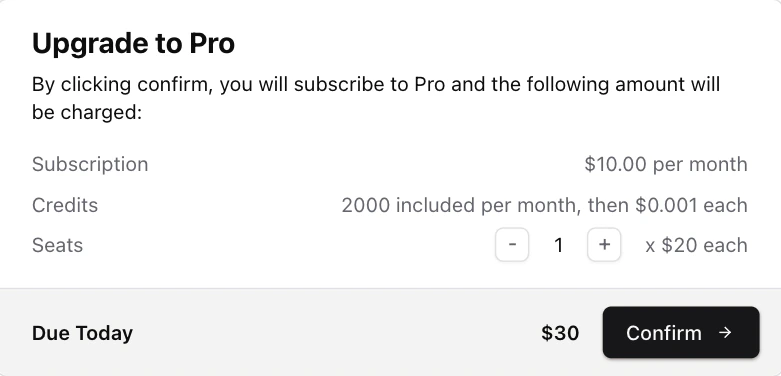
A users first payment will happen via a Stripe hosted Checkout URL. After that, you can configure the Payment Confirmation dialog to open when a customer wants to make another payment (eg upgrades, downgrades, topups).

This component allows you to let your customers preview how much will be charged, and confirm the change.

<img src="https://mintcdn.com/autumn-b9b4c0fb/mt4Df_QNHzb7TP7B/assets/quickstart/ui-components/product-change-dialog.png?fit=max&auto=format&n=mt4Df_QNHzb7TP7B&q=85&s=37178728d7cbe15a347d45161371c508" alt="Product Change Dialog" className="border" width="781" height="376" data-path="assets/quickstart/ui-components/product-change-dialog.png" />

You can use the component as is, or download the shadcn/ui component and edit it to your needs.

**React**

```jsx theme={null}
import { CheckoutDialog } from "autumn-js/react";
```

**shadcn/ui**

<CodeGroup>
  ```bash npm theme={null}
  npx shadcn@latest add https://ui.useautumn.com/checkout-dialog
  ```

  ```bash pnpm theme={null}
  pnpm dlx shadcn@latest add https://ui.useautumn.com/checkout-dialog
  ```

  ```bash yarn theme={null}
  yarn dlx shadcn@latest add https://ui.useautumn.com/checkout-dialog
  ```

  ```bash bun theme={null}
  bunx --bun shadcn@latest add https://ui.useautumn.com/checkout-dialog
  ```
</CodeGroup>

This will download the checkout-dialog component in your `/components` directory, under a `/autumn` folder.

#### Usage

Pass in the `checkout-dialog` component to the `checkout()` hook. This allows Autumn to automatically open the checkout dialog when they want to change their active product. The dialog will open if:

* The customer needs to input a quantity for their purchase (ie, if the product has prepaid prices)
* If the customer's payment method is already on file (ie, for upgrades, downgrades or add-ons).

When the customer confirms the purchase, Autumn will attach the product to the customer.

<Check>
  If there are no inputs required and it's a new customer (without an existing
  payment method), the customer will be redirected straight to the Stripe
  checkout page.
</Check>

```jsx theme={null}
import CheckoutDialog from "@/components/autumn/checkout-dialog";
// or import { CheckoutDialog } from "autumn-js/react";
import { useCustomer } from "autumn-js/react";

const { checkout } = useCustomer();
<Button
  onClick={async () =>
    await checkout({
      productId: "pro",
      dialog: CheckoutDialog,
    })
  }
/>;
```

#### Scenarios

When you install `checkout-dialog`, a `@/lib/autumn/checkout-content.tsx` file is also installed. This file contains the dialog texts for each `scenario` (returned from the `checkout` function), which you can customize how you want.

```tsx /lib/autumn/get-checkout-content.tsx [expandable] theme={null}
import { CheckProductPreview } from "autumn-js";

export const getAttachContent = (preview: CheckProductPreview) => {
  const {
    scenario,
    product_name,
    recurring,
    current_product_name,
    next_cycle_at,
  } = preview;

  const nextCycleAtStr = next_cycle_at
    ? new Date(next_cycle_at).toLocaleDateString()
    : undefined;

  switch (scenario) {
    case "scheduled":
      return {
        title: <p>Scheduled product already exists</p>,
        message: <p>You already have this product scheduled to start soon.</p>,
      };

    case "active":
      return {
        title: <p>Product already active</p>,
        message: <p>You are already subscribed to this product.</p>,
      };

    case "new":
      if (recurring) {
        return {
          title: <p>Subscribe to {product_name}</p>,
          message: (
            <p>
              By clicking confirm, you will be subscribed to {product_name} and
              your card will be charged immediately.
            </p>
          ),
        };
      } else {
        return {
          title: <p>Purchase {product_name}</p>,
          message: (
            <p>
              By clicking confirm, you will purchase {product_name} and your
              card will be charged immedaitely.
            </p>
          ),
        };
      }

    case "renew":
      return {
        title: <p>Renew</p>,
        message: (
          <p>
            By clicking confirm, you will renew your subscription to{" "}
            {product_name}.
          </p>
        ),
      };

    case "upgrade":
      return {
        title: <p>Upgrade to {product_name}</p>,
        message: (
          <p>
            By clicking confirm, you will upgrade your subscription to{" "}
            {product_name} and your card will be charged immediately.
          </p>
        ),
      };

    case "downgrade":
      return {
        title: <p>Downgrade to {product_name}</p>,
        message: (
          <p>
            By clicking confirm, your current subscription to{" "}
            {current_product_name} will be cancelled and a new subscription to{" "}
            {product_name} will begin on {nextCycleAtStr}.
          </p>
        ),
      };

    case "cancel":
      return {
        title: <p>Cancel</p>,
        message: (
          <p>
            By clicking confirm, your subscription to {current_product_name}{" "}
            will end on {nextCycleAtStr}.
          </p>
        ),
      };

    default:
      return {
        title: <p>Change Subscription</p>,
        message: <p>You are about to change your subscription.</p>,
      };
  }
};
```

## Build your own

Typically when charging a customer's card, you'll want to display the payment information beforehand for the user to confirm. This is useful for upgrade, downgrade and add-on payment flows.

The `checkout` function will return the data your customer will want to see, such as price information, billing cycle, etc.

<Check>
  If the customer's payment details aren't on file (eg, its a new payment),
  `checkout` will return a payment URL.
</Check>

<CodeGroup>
  ```typescript React theme={null}
  import { useCustomer } from "autumn-js/react";

  const { checkout } = useCustomer();

  const { data, error } = await checkout({
    productId: "pro",
  });
  ```

  ```typescript Node.js theme={null}
  import { Autumn as autumn } from "autumn-js";

  const { data, error } = await autumn.checkout({
    customer_id: "user_123",
    product_id: "pro",
  });
  ```

  ```python Python theme={null}
  import asyncio
  from autumn import Autumn

  autumn = Autumn("am_sk_1234567890")

  async def main():
    response = await autumn.checkout(
        customer_id='user_123',
        product_id='pro'
    )

  asyncio.run(main())
  ```

  ```bash cURL theme={null}
  curl -X POST https://api.useautumn.com/v1/checkout \
    -H "Authorization: Bearer am_sk_xxxxxxxxxx" \
    -H "Content-Type: application/json" \
    -d '{
      "customer_id": "user_123",
      "product_id": "pro",
    }'
  ```
</CodeGroup>

<CodeGroup>
  ```json Upgrade [expandable] theme={null}
  {
      "customer_id": "user_1234",
      "code": "product_found",
      "product_id": "ultra",
      "allowed": false,
      "preview": {
          "title": "Upgrade to Ultra",
          "message": "By clicking confirm, you will upgrade your plan to Ultra and the following amount will be charged to your card immediately:",
          "scenario": "upgrade",
          "product_id": "ultra",
          "product_name": "Ultra",
          "recurring": true,
          "next_cycle_at": 1750604867000,
          "current_product_name": "Pro",
          "items": [
              {
                  "price": "-$3.53",
                  "description": "Unused time on Pro after 31 May 2025"
              },
              {
                  "price": "$7.06",
                  "description": "Remaining time on Ultra after 31 May 2025"
              }
          ],
          "options": [
              {
                  "feature_id": "seats",
                  "feature_name": "seats",
                  "billing_units": 1,
                  "included_usage": 0,
                  "price": 4
              }
          ],
          "due_today": {
              "price": 3.53,
              "currency": "USD"
          },
          "due_next_cycle": {
              "price": 10,
              "currency": "USD"
          },
          "product": {
              "id": "ultra",
              "name": "Ultra",
              "group": null,
              "env": "sandbox",
              "is_add_on": false,
              "is_default": false,
              "version": 1,
              "created_at": 1747926427301,
              "items": [
                  {
                      "type": "price",
                      "feature_id": null,
                      "interval": "month",
                      "price": 10
                  },
                  {
                      "type": "priced_feature",
                      "feature_id": "seats",
                      "feature_type": "continuous_use",
                      "included_usage": 0,
                      "interval": "month",
                      "price": null,
                      "tiers": [
                          {
                              "to": "inf",
                              "amount": 4
                          }
                      ],
                      "usage_model": "prepaid",
                      "billing_units": 1,
                      "reset_usage_when_enabled": true
                  },
                  {
                      "type": "feature",
                      "feature_id": "chat_messages",
                      "feature_type": "single_use",
                      "included_usage": 20,
                      "interval": "month",
                      "reset_usage_when_enabled": true
                  }
              ],
              "free_trial": null
          }
      }
  }
  ```

  ```json Downgrade [expandable] theme={null}
  {
    "customer_id": "user_1234",
    "code": "product_found",
    "product_id": "pro",
    "allowed": false,
    "preview": {
      "title": "Downgrade to Pro",
      "message": "By clicking confirm, your current subscription to Ultra will end on 22 Jun 2025 and a new subscription to Pro will begin.",
      "scenario": "downgrade",
      "product_id": "pro",
      "product_name": "Pro",
      "recurring": true,
      "next_cycle_at": 1750604867000,
      "current_product_name": "Ultra",
      "error_on_attach": false,
      "product": {
        "id": "pro",
        "name": "Pro",
        "group": null,
        "env": "sandbox",
        "is_add_on": false,
        "is_default": false,
        "version": 1,
        "created_at": 1747912396998,
        "items": [
          {
            "type": "price",
            "feature_id": null,
            "interval": "month",
            "price": 5
          },
          {
            "type": "feature",
            "feature_id": "premium_support",
            "feature_type": "static"
          }
        ],
        "free_trial": null
      }
    }
  }
  ```

  ```json New Purchase theme={null}
  {
    "customer_id": "user_123",
    "code": "product_found",
    "product_id": "ultra",
    "allowed": false,
    "preview": null
  }
  ```
</CodeGroup>

The `preview` object that is returned from the `checkout` function can be used to display the data you want to the user.

Example implementation:

```tsx React theme={null}
import { useCustomer } from "autumn-js/react";

export default function PurchaseButton() {
  const { checkout, attach } = useCustomer();

  return (
    <button
      onClick={async () => {
        const { data } = await checkout({
          productId: "ultra",
        });

        //throw a browser popup if no checkout URL
        if (!data?.url && window.confirm(data.preview.scenario)) {
          await attach({
            productId: "ultra",
          });
        }
      }}
    >
      Upgrade to Ulta
    </button>
  );
}
```

If `preview` is returned, it will contain a `scenario` enum. You can use this to control the messaging you display to the user. See our shadcn/ui dialog messaging for an example.

| Scenario    | Description                                                                                               |
| ----------- | --------------------------------------------------------------------------------------------------------- |
| `upgrade`   | The customer is upgrading their product                                                                   |
| `downgrade` | The customer is downgrading to another paid tier                                                          |
| `cancel`    | The customer is downgrading to a free product                                                             |
| `renew`     | The customer is reactivating a product that was previously cancelled                                      |
| `scheduled` | The product is already scheduled to start at a future date (eg, for downgrades), so no changes are needed |
| `active`    | The customer already has the product active, so no changes are needed                                     |
