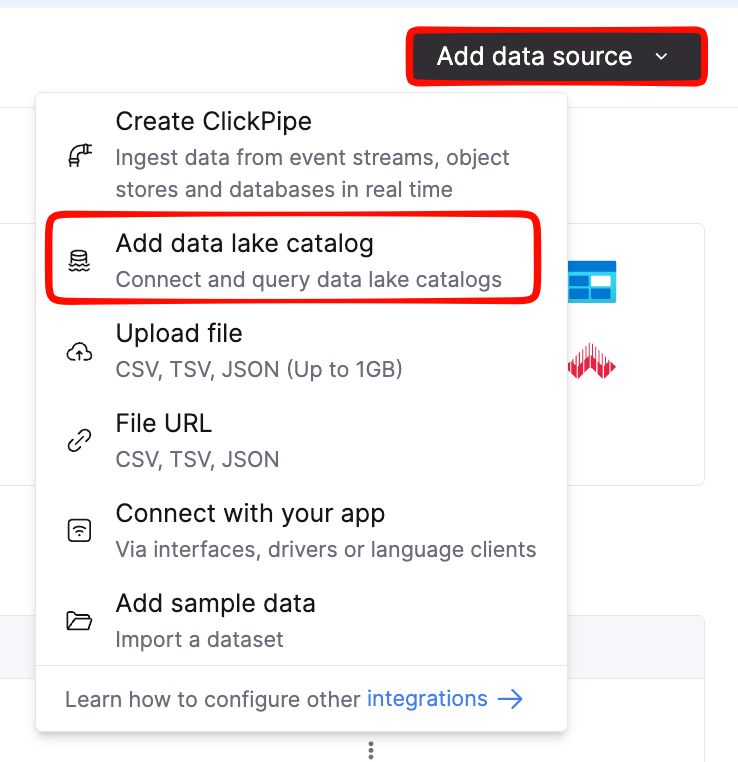
Attach ClickHouse or BigQuery to your Autumn Lakehouse catalog.
Available on request. The Autumn Lakehouse is provisioned per customer. Contact us at hey@useautumn.com to get access. Any customer may use our SQL endpoint instead.
Already connected for v2.3? You don’t need to reconnect. The v2.6 tables are published to the same catalog and namespace, next to your v2_3_* tables.
When your Lakehouse is provisioned, Autumn privately sends you:
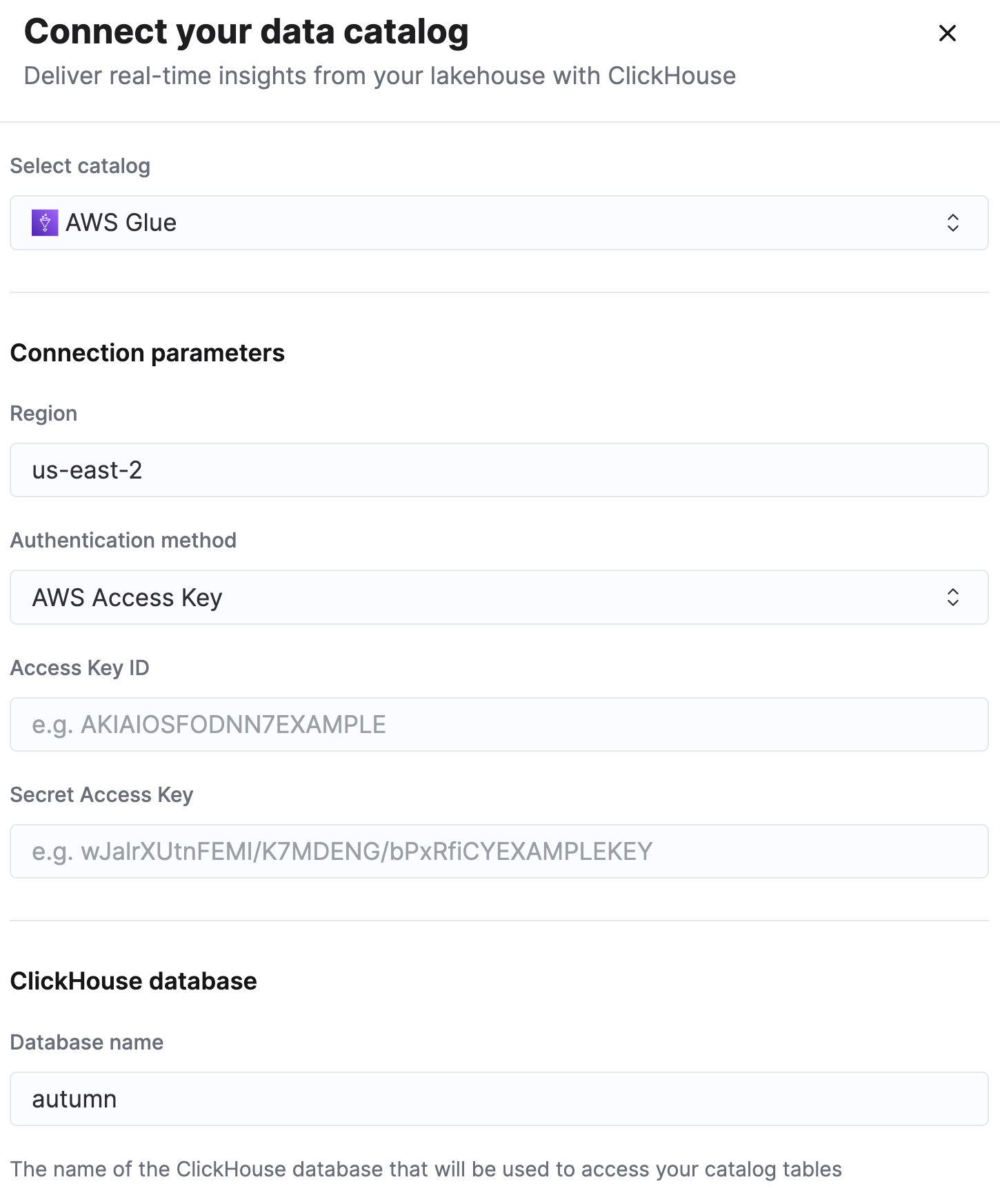
your catalog and namespace names (the namespace is where your tables live),
a scoped access key and secret for the object storage,
the region: us-east-2.
Keep these credentials private. If you connect BigQuery, you get a project and dataset instead, because Autumn owns the external connection and there are no storage credentials for you to hold.
Save the connection. The catalog mounts as a database, and your tables appear as `<catalog>`.`<namespace>.v2_6_<object>`.
The whole <namespace>.v2_6_<object> is the table name: the dot is part of the name, not a database separator. Backtick both parts when you query. See Querying.
Autumn provisions your Iceberg tables as BigLake external tables in a BigQuery dataset you are granted access to. We share the project and dataset names during onboarding; you don’t create the connection yourself. If you already read v2.3 through BigQuery, ask us to add the v2.6 tables to your dataset.
-- ClickHouseSELECT count() FROM `<catalog>`.`<namespace>.v2_6_customers` WHERE env = 'live';-- BigQuerySELECT COUNT(*) FROM `<project>.<dataset>.v2_6_customers` WHERE env = 'live';
{"docsConfig":{"theme":"mint","$schema":"https://mintlify.com/docs.json","name":"Autumn","colors":{"primary":"#8838ff","light":"#9b5cff","dark":"#8838ff"},"logo":{"light":"https://mintcdn.com/autumn-b9b4c0fb/BOEMpWFJsAdGcii1/assets/logo/autumn-dark.svg?fit=max\u0026auto=format\u0026n=BOEMpWFJsAdGcii1\u0026q=85\u0026s=720bd2227c435e77f2c91cbfcbccd274","dark":"https://mintcdn.com/autumn-b9b4c0fb/BOEMpWFJsAdGcii1/assets/logo/autumn-light.svg?fit=max\u0026auto=format\u0026n=BOEMpWFJsAdGcii1\u0026q=85\u0026s=f700b862e5d0ada8c89a5976d27863fe"},"favicon":"https://mintcdn.com/autumn-b9b4c0fb/ihHX49Ug6NamJ10t/favicon.svg?fit=max\u0026auto=format\u0026n=ihHX49Ug6NamJ10t\u0026q=85\u0026s=b1fd8b3e3086e5a3855a8cf8c45dd57a","api":{"playground":{"display":"interactive"},"examples":{"languages":["typescript","python","bash"]}},"appearance":{"default":"system","strict":false},"background":{"color":{"light":"#FFFFFF","dark":"#0A0A0A"}},"navbar":{"primary":{"type":"button","label":"Dashboard","href":"https://app.useautumn.com"}},"footer":{"socials":{"x":"https://x.com/autumnpricing","linkedin":"https://linkedin.com/company/useautumn"}},"fonts":{"heading":{"family":"Inter"},"body":{"family":"Inter"}},"contextual":{"options":["copy","cursor","view"],"display":"header"},"interaction":{"drilldown":true},"styling":{"latex":true},"navigation":{"global":{"anchors":[{"anchor":"Discord","icon":"discord","href":"https://discord.gg/STqxY92zuS"},{"anchor":"Website","icon":"globe","href":"https://useautumn.com"}]},"pages":[]}},"deployment":{"deploymentMetadataValue":{"subdomain":"autumn-b9b4c0fb","hasAudioNarration":false,"actualSubdomain":"autumn-b9b4c0fb","customDomains":["docs.useautumn.com"],"gitSource":{"type":"github","owner":"useautumn","repo":"autumn","deployBranch":"main","contentDirectory":"apps/docs/mintlify","isPrivate":true,"mountPath":"","label":""},"chroma":{"liveDeploymentHistoryId":"6aecab650c9d6432d6b4b15c","collectionId":"08e3bdf2-e16a-45e0-a209-92194762861a","schemaVersion":"v3","latestBuiltDeploymentHistoryId":"6aecab650c9d6432d6b4b15c"},"feedback":{"agentFeedback":true},"entitlements":{"AI_CHAT":{"status":"ENABLED"},"WEB_MCP":{"status":"ENABLED"},"NARRATION":{"status":"ENABLED"}},"buildId":"6aede180de69105c4467aa2c","clientVersion":"0.0.4074","searchFilterCounts":[{"language":"default","tag":"API Reference","count":107},{"language":"default","tag":"Documentation","count":59},{"language":"default","tag":"Billing","count":21},{"language":"default","tag":"Configure Pricing","count":19},{"language":"default","tag":"Lakehouse","count":18},{"language":"default","tag":"Customers","count":16},{"language":"default","tag":"Balances","count":13},{"language":"default","tag":"Rewards \u0026 Referrals","count":13},{"language":"default","tag":"Additional Resources","count":11},{"language":"default","tag":"Webhook Events","count":10}],"searchSettings":{"tuning":{"anchor":{"titleCoverageRelabel":true}}}},"assistantConfig":{"enableAskAiButton":false,"enableStarterQuestions":false,"enableAskAiSearchBar":true},"basePath":"","hasChatPermissions":true,"hasWebMcpPermissions":true,"toggles":[{"name":"kill-isr","enabled":true,"variant":{"name":"disabled","enabled":false,"feature_enabled":true},"impressionData":false},{"name":"agent-mintlify-slack","enabled":true,"variant":{"name":"disabled","enabled":false,"feature_enabled":true},"impressionData":false},{"name":"agent-integrations-settings","enabled":true,"variant":{"name":"disabled","enabled":false,"feature_enabled":true},"impressionData":false},{"name":"rbac-expansion","enabled":true,"variant":{"name":"disabled","enabled":false,"feature_enabled":true},"impressionData":false},{"name":"automations-pr-grouping","enabled":true,"variant":{"name":"disabled","enabled":false,"feature_enabled":true},"impressionData":false},{"name":"custom-prefix","enabled":true,"variant":{"name":"disabled","enabled":false,"feature_enabled":true},"impressionData":false},{"name":"analytics-v7","enabled":true,"variant":{"name":"disabled","enabled":false,"feature_enabled":true},"impressionData":false},{"name":"user-flows-analytics","enabled":true,"variant":{"name":"disabled","enabled":false,"feature_enabled":true},"impressionData":false},{"name":"no-publish-flow","enabled":true,"variant":{"name":"disabled","enabled":false,"feature_enabled":true},"impressionData":false},{"name":"workos-onboarding","enabled":true,"variant":{"name":"disabled","enabled":false,"feature_enabled":true},"impressionData":false},{"name":"llms-txt-v2","enabled":true,"variant":{"name":"disabled","enabled":false,"feature_enabled":true},"impressionData":false},{"name":"snapshot-serving-live","enabled":true,"variant":{"name":"disabled","enabled":false,"feature_enabled":true},"impressionData":false},{"name":"stripTemperatureMiddleware","enabled":true,"variant":{"name":"disabled","enabled":false,"feature_enabled":true},"impressionData":false},{"name":"support-platform-pylon-zendesk","enabled":true,"variant":{"name":"disabled","enabled":false,"feature_enabled":true},"impressionData":false},{"name":"snapshot-serving","enabled":true,"variant":{"name":"disabled","enabled":false,"feature_enabled":true},"impressionData":false},{"name":"instant-rollback","enabled":true,"variant":{"name":"disabled","enabled":false,"feature_enabled":true},"impressionData":false},{"name":"granular-notifications-server","enabled":true,"variant":{"name":"disabled","enabled":false,"feature_enabled":true},"impressionData":false},{"name":"granular-notifications","enabled":true,"variant":{"name":"disabled","enabled":false,"feature_enabled":true},"impressionData":false},{"name":"automations-fable","enabled":true,"variant":{"name":"disabled","enabled":false,"feature_enabled":true},"impressionData":false},{"name":"fixed-ai-action-pricing","enabled":true,"variant":{"name":"disabled","enabled":false,"feature_enabled":true},"impressionData":false},{"name":"automation-resolve-merge-conflict","enabled":true,"variant":{"name":"disabled","enabled":false,"feature_enabled":true},"impressionData":false},{"name":"scoped-publishing","enabled":true,"variant":{"name":"disabled","enabled":false,"feature_enabled":true},"impressionData":false},{"name":"mintql","enabled":true,"variant":{"name":"disabled","enabled":false,"feature_enabled":true},"impressionData":false},{"name":"page-level-analytics","enabled":true,"variant":{"name":"disabled","enabled":false,"feature_enabled":true},"impressionData":false},{"name":"editor-version-history-v2","enabled":true,"variant":{"name":"disabled","enabled":false,"feature_enabled":true},"impressionData":false},{"name":"billing-page-v2","enabled":true,"variant":{"name":"disabled","enabled":false,"feature_enabled":true},"impressionData":false},{"name":"full-page-search","enabled":true,"variant":{"name":"disabled","enabled":false,"feature_enabled":true},"impressionData":false},{"name":"workspace-projects","enabled":true,"variant":{"name":"disabled","enabled":false,"feature_enabled":true},"impressionData":false},{"name":"assistant-v5","enabled":true,"variant":{"name":"disabled","enabled":false,"feature_enabled":true},"impressionData":false},{"name":"fork-pr-previews","enabled":true,"variant":{"name":"disabled","enabled":false,"feature_enabled":true},"impressionData":false},{"name":"revalidation-jwt","enabled":true,"variant":{"name":"disabled","enabled":false,"feature_enabled":true},"impressionData":false},{"name":"vite-origin","enabled":true,"variant":{"name":"disabled","enabled":false,"feature_enabled":true},"impressionData":false},{"name":"workos-sso-scim","enabled":true,"variant":{"name":"disabled","enabled":false,"feature_enabled":true},"impressionData":false},{"name":"hobby-abuse-scan","enabled":true,"variant":{"name":"disabled","enabled":false,"feature_enabled":true},"impressionData":false},{"name":"dashboard-inbox","enabled":true,"variant":{"name":"disabled","enabled":false,"feature_enabled":true},"impressionData":false},{"name":"workos-signup","enabled":true,"variant":{"name":"disabled","enabled":false,"feature_enabled":true},"impressionData":false},{"name":"turbopuffer-dual-write","enabled":true,"variant":{"name":"disabled","enabled":false,"feature_enabled":true},"impressionData":false},{"name":"workos-enabled","enabled":true,"variant":{"name":"disabled","enabled":false,"feature_enabled":true},"impressionData":false},{"name":"approve-review-flow","enabled":true,"variant":{"name":"disabled","enabled":false,"feature_enabled":true},"impressionData":false},{"name":"sso-setup-deadline-banner","enabled":true,"variant":{"name":"disabled","enabled":false,"feature_enabled":true},"impressionData":false},{"name":"turbopuffer-serve","enabled":true,"variant":{"name":"disabled","enabled":false,"feature_enabled":true},"impressionData":false},{"name":"live-agents","enabled":true,"variant":{"name":"disabled","enabled":false,"feature_enabled":true},"impressionData":false},{"name":"comment-mode","enabled":true,"variant":{"name":"disabled","enabled":false,"feature_enabled":true},"impressionData":false}],"googleFontsInlined":false},"customCss":[{"filePath":"language-tabs.css","content":"[data-testid=\"code-sample-language-select\"],.code-sample-language-select,[aria-haspopup=\"listbox\"]{}"},{"filePath":"style.css","content":".prose>.api-section{display:none!important}"}],"page":{"pagePath":"documentation/lakehouse/v2-6/connecting","slug":"/documentation/lakehouse/v2-6/connecting","pageMetadata":{"title":"Connecting","sidebarTitle":"Connecting","description":"Attach ClickHouse or BigQuery to your Autumn Lakehouse catalog.","href":"/documentation/lakehouse/v2-6/connecting"},"description":{"compiledSource":"\"use strict\";\nconst {jsx: _jsx} = arguments[0];\nconst {useMDXComponents: _provideComponents} = arguments[0];\nfunction _createMdxContent(props) {\n const _components = {\n p: \"p\",\n ..._provideComponents(),\n ...props.components\n };\n return _jsx(_components.p, {\n children: \"Attach ClickHouse or BigQuery to your Autumn Lakehouse catalog.\"\n });\n}\nfunction MDXContent(props = {}) {\n const {wrapper: MDXLayout} = {\n ..._provideComponents(),\n ...props.components\n };\n return MDXLayout ? _jsx(MDXLayout, {\n ...props,\n children: _jsx(_createMdxContent, {\n ...props\n })\n }) : _createMdxContent(props);\n}\nreturn {\n default: MDXContent\n};\n","frontmatter":{},"scope":{}},"pageType":"default","mdx":{"mdxSource":{"compiledSource":"\"use strict\";const{Fragment:_Fragment,jsx:_jsx,jsxs:_jsxs}=arguments[0];const{useMDXComponents:_provideComponents}=arguments[0];function _createMdxContent(props){const _components={a:`a`,code:`code`,li:`li`,p:`p`,pre:`pre`,span:`span`,strong:`strong`,ul:`ul`,..._provideComponents(),...props.components},{CodeBlock,Frame,Heading,Note,OptimizedImage,Step,Steps,Tab,Tabs,Warning}=_components;if(!CodeBlock)_missingMdxReference(`CodeBlock`,true);if(!Frame)_missingMdxReference(`Frame`,true);if(!Heading)_missingMdxReference(`Heading`,true);if(!Note)_missingMdxReference(`Note`,true);if(!OptimizedImage)_missingMdxReference(`OptimizedImage`,true);if(!Step)_missingMdxReference(`Step`,true);if(!Steps)_missingMdxReference(`Steps`,true);if(!Tab)_missingMdxReference(`Tab`,true);if(!Tabs)_missingMdxReference(`Tabs`,true);if(!Warning)_missingMdxReference(`Warning`,true);return _jsxs(_Fragment,{children:[_jsx(Warning,{children:_jsxs(_components.p,{children:[_jsx(_components.strong,{children:`Available on request.`}),` The Autumn Lakehouse is provisioned per customer. Contact us at `,_jsx(_components.a,{href:`mailto:hey@useautumn.com`,children:`hey@useautumn.com`}),` to get access. Any customer may use our `,_jsx(_components.a,{href:`/documentation/query-with-sql`,children:`SQL endpoint`}),` instead.`]})}),`\n`,_jsx(Note,{children:_jsxs(_components.p,{children:[_jsx(_components.strong,{children:`Already connected for v2.3?`}),` You don’t need to reconnect. The v2.6 tables are published to the same catalog and namespace, next to your `,_jsx(_components.code,{children:`v2_3_*`}),` tables.`]})}),`\n`,_jsx(_components.p,{children:`When your Lakehouse is provisioned, Autumn privately sends you:`}),`\n`,_jsxs(_components.ul,{children:[`\n`,_jsxs(_components.li,{children:[`your `,_jsx(_components.strong,{children:`catalog`}),` and `,_jsx(_components.strong,{children:`namespace`}),` names (the namespace is where your tables live),`]}),`\n`,_jsxs(_components.li,{children:[`a `,_jsx(_components.strong,{children:`scoped access key and secret`}),` for the object storage,`]}),`\n`,_jsxs(_components.li,{children:[`the `,_jsx(_components.strong,{children:`region`}),`: `,_jsx(_components.code,{children:`us-east-2`}),`.`]}),`\n`]}),`\n`,_jsxs(_components.p,{children:[`Keep these credentials private. If you connect `,_jsx(_components.strong,{children:`BigQuery`}),`, you get a `,_jsx(_components.strong,{children:`project`}),` and `,_jsx(_components.strong,{children:`dataset`}),` instead, because Autumn owns the external connection and there are no storage credentials for you to hold.`]}),`\n`,_jsxs(Tabs,{children:[_jsx(Tab,{title:`ClickHouse`,id:`clickhouse`,\"data-child-heading-ids\":`[\"add-a-data-lake-catalog\",\"configure-the-catalog\",\"save-and-browse\"]`,children:_jsxs(Steps,{children:[_jsxs(Step,{children:[_jsx(Heading,{level:`4`,id:`add-a-data-lake-catalog`,children:`Add a Data Lake Catalog`}),_jsxs(_components.p,{children:[`In ClickHouse Cloud, go to `,_jsx(_components.strong,{children:`Data Sources → Add → Data Lake Catalog → AWS Glue`}),`.`]}),_jsx(Frame,{children:_jsx(OptimizedImage,{src:`https://mintcdn.com/autumn-b9b4c0fb/upS3Dj1rCWylIZHt/assets/lakehouse/ch-add-data-source.png?fit=max\u0026auto=format\u0026n=upS3Dj1rCWylIZHt\u0026q=85\u0026s=71b36c431f01135f13ad4a7c43723d1c`,alt:`ClickHouse Cloud Data Sources page with the Add button`,\"data-og-width\":`738`,width:`738`,\"data-og-height\":`762`,height:`762`,\"data-path\":`assets/lakehouse/ch-add-data-source.png`,\"data-optimize\":`true`,\"data-opv\":`3`,srcset:`https://mintcdn.com/autumn-b9b4c0fb/upS3Dj1rCWylIZHt/assets/lakehouse/ch-add-data-source.png?w=280\u0026fit=max\u0026auto=format\u0026n=upS3Dj1rCWylIZHt\u0026q=85\u0026s=e6c37e310d604aa175b8bb970296c410 280w, https://mintcdn.com/autumn-b9b4c0fb/upS3Dj1rCWylIZHt/assets/lakehouse/ch-add-data-source.png?w=560\u0026fit=max\u0026auto=format\u0026n=upS3Dj1rCWylIZHt\u0026q=85\u0026s=19ef7700ffce2294e1c5a85e5c8e9fc7 560w, https://mintcdn.com/autumn-b9b4c0fb/upS3Dj1rCWylIZHt/assets/lakehouse/ch-add-data-source.png?w=840\u0026fit=max\u0026auto=format\u0026n=upS3Dj1rCWylIZHt\u0026q=85\u0026s=934e4badb85bd41472d95125efd06edd 840w, https://mintcdn.com/autumn-b9b4c0fb/upS3Dj1rCWylIZHt/assets/lakehouse/ch-add-data-source.png?w=1100\u0026fit=max\u0026auto=format\u0026n=upS3Dj1rCWylIZHt\u0026q=85\u0026s=46af3ef15ab870ef4183d22b2f792b4b 1100w, https://mintcdn.com/autumn-b9b4c0fb/upS3Dj1rCWylIZHt/assets/lakehouse/ch-add-data-source.png?w=1650\u0026fit=max\u0026auto=format\u0026n=upS3Dj1rCWylIZHt\u0026q=85\u0026s=1160995ba367adf70d2e0935071cec36 1650w, https://mintcdn.com/autumn-b9b4c0fb/upS3Dj1rCWylIZHt/assets/lakehouse/ch-add-data-source.png?w=2500\u0026fit=max\u0026auto=format\u0026n=upS3Dj1rCWylIZHt\u0026q=85\u0026s=674995f412f8e57114c0639f29e591bd 2500w`})})]}),_jsxs(Step,{children:[_jsx(Heading,{level:`4`,id:`configure-the-catalog`,children:`Configure the catalog`}),_jsxs(_components.p,{children:[`Set the `,_jsx(_components.strong,{children:`region`}),` to `,_jsx(_components.code,{children:`us-east-2`}),`, then paste the `,_jsx(_components.strong,{children:`access key`}),` and `,_jsx(_components.strong,{children:`secret`}),` Autumn sent you.`]}),_jsx(Frame,{children:_jsx(OptimizedImage,{src:`https://mintcdn.com/autumn-b9b4c0fb/upS3Dj1rCWylIZHt/assets/lakehouse/ch-add-catalog.png?fit=max\u0026auto=format\u0026n=upS3Dj1rCWylIZHt\u0026q=85\u0026s=bffd82298d60e7a67d93e36496d4d61d`,alt:`Selecting Data Lake Catalog then AWS Glue as the source type`,\"data-og-width\":`1450`,width:`1450`,\"data-og-height\":`1746`,height:`1746`,\"data-path\":`assets/lakehouse/ch-add-catalog.png`,\"data-optimize\":`true`,\"data-opv\":`3`,srcset:`https://mintcdn.com/autumn-b9b4c0fb/upS3Dj1rCWylIZHt/assets/lakehouse/ch-add-catalog.png?w=280\u0026fit=max\u0026auto=format\u0026n=upS3Dj1rCWylIZHt\u0026q=85\u0026s=3b82ba684beab0a7caf8369406fe6e60 280w, https://mintcdn.com/autumn-b9b4c0fb/upS3Dj1rCWylIZHt/assets/lakehouse/ch-add-catalog.png?w=560\u0026fit=max\u0026auto=format\u0026n=upS3Dj1rCWylIZHt\u0026q=85\u0026s=7eedcd8b7830e5fe070be492693363dc 560w, https://mintcdn.com/autumn-b9b4c0fb/upS3Dj1rCWylIZHt/assets/lakehouse/ch-add-catalog.png?w=840\u0026fit=max\u0026auto=format\u0026n=upS3Dj1rCWylIZHt\u0026q=85\u0026s=2340f458cc6bc195800699d09d05a162 840w, https://mintcdn.com/autumn-b9b4c0fb/upS3Dj1rCWylIZHt/assets/lakehouse/ch-add-catalog.png?w=1100\u0026fit=max\u0026auto=format\u0026n=upS3Dj1rCWylIZHt\u0026q=85\u0026s=23a6f62b410b4dcff2bfdbd63fb28340 1100w, https://mintcdn.com/autumn-b9b4c0fb/upS3Dj1rCWylIZHt/assets/lakehouse/ch-add-catalog.png?w=1650\u0026fit=max\u0026auto=format\u0026n=upS3Dj1rCWylIZHt\u0026q=85\u0026s=5f8b181ce1c92f4bfb6d1627b2617d8d 1650w, https://mintcdn.com/autumn-b9b4c0fb/upS3Dj1rCWylIZHt/assets/lakehouse/ch-add-catalog.png?w=2500\u0026fit=max\u0026auto=format\u0026n=upS3Dj1rCWylIZHt\u0026q=85\u0026s=15534adec3d1819858240091a07b6a6c 2500w`})})]}),_jsxs(Step,{children:[_jsx(Heading,{level:`4`,id:`save-and-browse`,children:`Save and browse`}),_jsxs(_components.p,{children:[`Save the connection. The catalog mounts as a database, and your tables appear as `,_jsx(_components.code,{children:\"`\u003ccatalog>`.`\u003cnamespace>.v2_6_\u003cobject>`\"}),`.`]}),_jsx(Note,{children:_jsxs(_components.p,{children:[`The whole `,_jsx(_components.code,{children:`\u003cnamespace>.v2_6_\u003cobject>`}),` is the `,_jsx(_components.strong,{children:`table name`}),`: the dot is part of the name, not a database separator. Backtick both parts when you query. See `,_jsx(_components.a,{href:`/documentation/lakehouse/v2-6/querying#addressing-tables`,children:`Querying`}),`.`]})})]})]})}),_jsx(Tab,{title:`BigQuery`,id:`bigquery`,\"data-child-heading-ids\":`[\"access-the-dataset\",\"verify-access\"]`,children:_jsxs(Steps,{children:[_jsxs(Step,{children:[_jsx(Heading,{level:`4`,id:`access-the-dataset`,children:`Access the dataset`}),_jsxs(_components.p,{children:[`Autumn provisions your Iceberg tables as BigLake external tables in a BigQuery dataset you are granted access to. We share the `,_jsx(_components.strong,{children:`project`}),` and `,_jsx(_components.strong,{children:`dataset`}),` names during onboarding; you don’t create the connection yourself. If you already read v2.3 through BigQuery, ask us to add the v2.6 tables to your dataset.`]})]}),_jsxs(Step,{children:[_jsx(Heading,{level:`4`,id:`verify-access`,children:`Verify access`}),_jsxs(_components.p,{children:[`List the dataset to confirm the tables are visible. They appear as `,_jsx(_components.code,{children:\"`\u003cproject>.\u003cdataset>.v2_6_\u003cobject>`\"}),`, plus `,_jsx(_components.code,{children:`events`}),`.`]}),_jsx(CodeBlock,{filename:``,numberOfLines:`4`,language:`sql`,children:_jsx(_components.pre,{className:`shiki shiki-themes github-light-default dark-plus`,style:{backgroundColor:`#ffffff`,\"--shiki-dark-bg\":`#0B0C0E`,color:`#1f2328`,\"--shiki-dark\":`#D4D4D4`},language:`sql`,children:_jsxs(_components.code,{language:`sql`,numberOfLines:`4`,children:[_jsxs(_components.span,{className:`line`,children:[_jsx(_components.span,{style:{color:`#CF222E`,\"--shiki-dark\":`#569CD6`},children:`SELECT`}),_jsx(_components.span,{style:{color:`#1F2328`,\"--shiki-dark\":`#D4D4D4`},children:` table_name`})]}),`\n`,_jsxs(_components.span,{className:`line`,children:[_jsx(_components.span,{style:{color:`#CF222E`,\"--shiki-dark\":`#569CD6`},children:`FROM`}),_jsx(_components.span,{style:{color:`#0A3069`,\"--shiki-dark\":`#CE9178`},children:\" `\u003cproject>.\u003cdataset>.INFORMATION_SCHEMA.TABLES`\"})]}),`\n`,_jsxs(_components.span,{className:`line`,children:[_jsx(_components.span,{style:{color:`#CF222E`,\"--shiki-dark\":`#569CD6`},children:`WHERE`}),_jsx(_components.span,{style:{color:`#1F2328`,\"--shiki-dark\":`#D4D4D4`},children:` table_name `}),_jsx(_components.span,{style:{color:`#CF222E`,\"--shiki-dark\":`#569CD6`},children:`LIKE`}),_jsx(_components.span,{style:{color:`#0A3069`,\"--shiki-dark\":`#CE9178`},children:` 'v2_6_%'`}),_jsx(_components.span,{style:{color:`#CF222E`,\"--shiki-dark\":`#569CD6`},children:` OR`}),_jsx(_components.span,{style:{color:`#1F2328`,\"--shiki-dark\":`#D4D4D4`},children:` table_name `}),_jsx(_components.span,{style:{color:`#CF222E`,\"--shiki-dark\":`#D4D4D4`},children:`=`}),_jsx(_components.span,{style:{color:`#0A3069`,\"--shiki-dark\":`#CE9178`},children:` 'events'`})]}),`\n`,_jsxs(_components.span,{className:`line`,children:[_jsx(_components.span,{style:{color:`#CF222E`,\"--shiki-dark\":`#569CD6`},children:`ORDER BY`}),_jsx(_components.span,{style:{color:`#1F2328`,\"--shiki-dark\":`#D4D4D4`},children:` table_name;`})]}),`\n`]})})})]})]})})]}),`\n`,_jsx(Heading,{level:`2`,id:`test-the-connection`,children:`Test the connection`}),`\n`,_jsx(_components.p,{children:`Count your customers:`}),`\n`,_jsx(CodeBlock,{filename:``,numberOfLines:`5`,language:`sql`,children:_jsx(_components.pre,{className:`shiki shiki-themes github-light-default dark-plus`,style:{backgroundColor:`#ffffff`,\"--shiki-dark-bg\":`#0B0C0E`,color:`#1f2328`,\"--shiki-dark\":`#D4D4D4`},language:`sql`,children:_jsxs(_components.code,{language:`sql`,numberOfLines:`5`,children:[_jsx(_components.span,{className:`line`,children:_jsx(_components.span,{style:{color:`#6E7781`,\"--shiki-dark\":`#6A9955`},children:`-- ClickHouse`})}),`\n`,_jsxs(_components.span,{className:`line`,children:[_jsx(_components.span,{style:{color:`#CF222E`,\"--shiki-dark\":`#569CD6`},children:`SELECT`}),_jsx(_components.span,{style:{color:`#0550AE`,\"--shiki-dark\":`#DCDCAA`},children:` count`}),_jsx(_components.span,{style:{color:`#1F2328`,\"--shiki-dark\":`#D4D4D4`},children:`() `}),_jsx(_components.span,{style:{color:`#CF222E`,\"--shiki-dark\":`#569CD6`},children:`FROM`}),_jsx(_components.span,{style:{color:`#0A3069`,\"--shiki-dark\":`#CE9178`},children:\" `\u003ccatalog>`\"}),_jsx(_components.span,{style:{color:`#1F2328`,\"--shiki-dark\":`#D4D4D4`},children:`.`}),_jsx(_components.span,{style:{color:`#0A3069`,\"--shiki-dark\":`#CE9178`},children:\"`\u003cnamespace>.v2_6_customers`\"}),_jsx(_components.span,{style:{color:`#CF222E`,\"--shiki-dark\":`#569CD6`},children:` WHERE`}),_jsx(_components.span,{style:{color:`#1F2328`,\"--shiki-dark\":`#D4D4D4`},children:` env `}),_jsx(_components.span,{style:{color:`#CF222E`,\"--shiki-dark\":`#D4D4D4`},children:`=`}),_jsx(_components.span,{style:{color:`#0A3069`,\"--shiki-dark\":`#CE9178`},children:` 'live'`}),_jsx(_components.span,{style:{color:`#1F2328`,\"--shiki-dark\":`#D4D4D4`},children:`;`})]}),`\n`,_jsx(_components.span,{className:`line`}),`\n`,_jsx(_components.span,{className:`line`,children:_jsx(_components.span,{style:{color:`#6E7781`,\"--shiki-dark\":`#6A9955`},children:`-- BigQuery`})}),`\n`,_jsxs(_components.span,{className:`line`,children:[_jsx(_components.span,{style:{color:`#CF222E`,\"--shiki-dark\":`#569CD6`},children:`SELECT`}),_jsx(_components.span,{style:{color:`#0550AE`,\"--shiki-dark\":`#DCDCAA`},children:` COUNT`}),_jsx(_components.span,{style:{color:`#1F2328`,\"--shiki-dark\":`#D4D4D4`},children:`(`}),_jsx(_components.span,{style:{color:`#CF222E`,\"--shiki-dark\":`#D4D4D4`},children:`*`}),_jsx(_components.span,{style:{color:`#1F2328`,\"--shiki-dark\":`#D4D4D4`},children:`) `}),_jsx(_components.span,{style:{color:`#CF222E`,\"--shiki-dark\":`#569CD6`},children:`FROM`}),_jsx(_components.span,{style:{color:`#0A3069`,\"--shiki-dark\":`#CE9178`},children:\" `\u003cproject>.\u003cdataset>.v2_6_customers`\"}),_jsx(_components.span,{style:{color:`#CF222E`,\"--shiki-dark\":`#569CD6`},children:` WHERE`}),_jsx(_components.span,{style:{color:`#1F2328`,\"--shiki-dark\":`#D4D4D4`},children:` env `}),_jsx(_components.span,{style:{color:`#CF222E`,\"--shiki-dark\":`#D4D4D4`},children:`=`}),_jsx(_components.span,{style:{color:`#0A3069`,\"--shiki-dark\":`#CE9178`},children:` 'live'`}),_jsx(_components.span,{style:{color:`#1F2328`,\"--shiki-dark\":`#D4D4D4`},children:`;`})]}),`\n`]})})}),`\n`,_jsxs(_components.p,{children:[`Then read `,_jsx(_components.a,{href:`/documentation/lakehouse/v2-6/schema`,children:`Schema Reference`}),` to see what’s available and `,_jsx(_components.a,{href:`/documentation/lakehouse/v2-6/querying`,children:`Querying`}),` for examples.`]})]})}function MDXContent(props={}){const{wrapper:MDXLayout}={..._provideComponents(),...props.components};return MDXLayout?_jsx(MDXLayout,{...props,children:_jsx(_createMdxContent,{...props})}):_createMdxContent(props)}return{default:MDXContent};function _missingMdxReference(id,component){throw new Error(`Expected `+(component?`component`:`object`)+\" `\"+id+\"` to be defined: you likely forgot to import, pass, or provide it.\")}","frontmatter":{},"scope":{"config":{},"pageMetadata":{"title":"Connecting","sidebarTitle":"Connecting","description":"Attach ClickHouse or BigQuery to your Autumn Lakehouse catalog.","href":"/documentation/lakehouse/v2-6/connecting"}}},"mdxSourceWithNoJs":null},"mdxExtracts":{"tableOfContents":[{"title":"Add a Data Lake Catalog","slug":"add-a-data-lake-catalog","depth":4,"children":[],"tabId":"clickhouse"},{"title":"Configure the catalog","slug":"configure-the-catalog","depth":4,"children":[],"tabId":"clickhouse"},{"title":"Save and browse","slug":"save-and-browse","depth":4,"children":[],"tabId":"clickhouse"},{"title":"Access the dataset","slug":"access-the-dataset","depth":4,"children":[],"tabId":"bigquery"},{"title":"Verify access","slug":"verify-access","depth":4,"children":[],"tabId":"bigquery"},{"title":"Test the connection","slug":"test-the-connection","depth":2,"children":[]}],"codeExamples":{}},"jsLinks":["/_mintlify/custom/autumn-b9b4c0fb/d78b8c063824141d/dynamic-response.js"],"subdomain":"autumn-b9b4c0fb","siteName":"Autumn","title":"Connecting - Autumn","navMaps":{"firstHrefInVersion":{},"firstHrefInLanguage":{}},"lastModified":"2026-11-06T14:18:16.219Z","originalFileLocation":"documentation/lakehouse/v2-6/connecting.mdx"},"headHtml":"\u003cscript data-mint-head>(function(){var d=document.documentElement,p=null;if(!p){try{p=localStorage.getItem(\"isDarkMode\")}catch(e){}if(p==='true')p='dark';else if(p==='false')p='light';if(p!=='light'\u0026\u0026p!=='dark'\u0026\u0026p!=='system')p=\"system\"}var r=p==='system'?(matchMedia(\"(prefers-color-scheme: dark)\").matches?'dark':'light'):p;d.classList.remove(r==='dark'?'light':'dark');d.classList.add(r);d.setAttribute(\"data-theme-preference\",p)})();\u003c/script>\u003cmeta data-mint-head name=\"description\" content=\"Attach ClickHouse or BigQuery to your Autumn Lakehouse catalog.\">\u003cmeta data-mint-head name=\"application-name\" content=\"Autumn\">\u003cmeta data-mint-head name=\"generator\" content=\"Mintlify\">\u003clink data-mint-head rel=\"icon\" type=\"image/png\" sizes=\"192x192\" href=\"/mintlify-assets/_mintlify/favicons/autumn-b9b4c0fb/LQO5vXfVIKEXnzb8/_generated/favicon/android-chrome-192x192.png\" media=\"(prefers-color-scheme: light)\">\u003clink data-mint-head rel=\"apple-touch-icon\" type=\"image/png\" sizes=\"180x180\" href=\"/mintlify-assets/_mintlify/favicons/autumn-b9b4c0fb/LQO5vXfVIKEXnzb8/_generated/favicon/apple-touch-icon.png\">\u003clink data-mint-head rel=\"icon\" type=\"image/png\" sizes=\"16x16\" href=\"/mintlify-assets/_mintlify/favicons/autumn-b9b4c0fb/LQO5vXfVIKEXnzb8/_generated/favicon/favicon-16x16.png\" media=\"(prefers-color-scheme: light)\">\u003clink data-mint-head rel=\"icon\" type=\"image/png\" sizes=\"32x32\" href=\"/mintlify-assets/_mintlify/favicons/autumn-b9b4c0fb/LQO5vXfVIKEXnzb8/_generated/favicon/favicon-32x32.png\" media=\"(prefers-color-scheme: light)\">\u003clink data-mint-head rel=\"shortcut icon\" type=\"image/x-icon\" href=\"/mintlify-assets/_mintlify/favicons/autumn-b9b4c0fb/LQO5vXfVIKEXnzb8/_generated/favicon/favicon.ico\" media=\"(prefers-color-scheme: light)\">\u003clink data-mint-head rel=\"icon\" type=\"image/png\" sizes=\"192x192\" href=\"/mintlify-assets/_mintlify/favicons/autumn-b9b4c0fb/LQO5vXfVIKEXnzb8/_generated/favicon-dark/android-chrome-192x192.png\" media=\"(prefers-color-scheme: dark)\">\u003clink data-mint-head rel=\"icon\" type=\"image/png\" sizes=\"16x16\" href=\"/mintlify-assets/_mintlify/favicons/autumn-b9b4c0fb/LQO5vXfVIKEXnzb8/_generated/favicon-dark/favicon-16x16.png\" media=\"(prefers-color-scheme: dark)\">\u003clink data-mint-head rel=\"icon\" type=\"image/png\" sizes=\"32x32\" href=\"/mintlify-assets/_mintlify/favicons/autumn-b9b4c0fb/LQO5vXfVIKEXnzb8/_generated/favicon-dark/favicon-32x32.png\" media=\"(prefers-color-scheme: dark)\">\u003clink data-mint-head rel=\"shortcut icon\" type=\"image/x-icon\" href=\"/mintlify-assets/_mintlify/favicons/autumn-b9b4c0fb/LQO5vXfVIKEXnzb8/_generated/favicon-dark/favicon.ico\" media=\"(prefers-color-scheme: dark)\">\u003cmeta data-mint-head property=\"og:title\" content=\"Connecting - Autumn\">\u003cmeta data-mint-head property=\"og:description\" content=\"Attach ClickHouse or BigQuery to your Autumn Lakehouse catalog.\">\u003cmeta data-mint-head property=\"og:site_name\" content=\"Autumn\">\u003cmeta data-mint-head property=\"og:url\" content=\"https://docs.useautumn.com/documentation/lakehouse/v2-6/connecting\">\u003cmeta data-mint-head property=\"og:type\" content=\"website\">\u003cmeta data-mint-head property=\"og:image\" content=\"https://autumn-b9b4c0fb.mintlify.site/_mintlify/api/og/v2?division=Lakehouse\u0026amp;title=Connecting\u0026amp;description=Attach+ClickHouse+or+BigQuery+to+your+Autumn+Lakehouse+catalog.\u0026amp;theme=3bf7e6d15826cac91d0b643c\u0026amp;signature=650d0a8171650f1481509ad54d54bc1ab37f1c183cd8fbb9f89ca9e0e8d9b507\">\u003cmeta data-mint-head property=\"og:image:width\" content=\"1200\">\u003cmeta data-mint-head property=\"og:image:height\" content=\"630\">\u003cmeta data-mint-head name=\"twitter:card\" content=\"summary_large_image\">\u003cmeta data-mint-head name=\"twitter:title\" content=\"Connecting - Autumn\">\u003cmeta data-mint-head name=\"twitter:description\" content=\"Attach ClickHouse or BigQuery to your Autumn Lakehouse catalog.\">\u003cmeta data-mint-head name=\"twitter:image\" content=\"https://autumn-b9b4c0fb.mintlify.site/_mintlify/api/og/v2?division=Lakehouse\u0026amp;title=Connecting\u0026amp;description=Attach+ClickHouse+or+BigQuery+to+your+Autumn+Lakehouse+catalog.\u0026amp;theme=3bf7e6d15826cac91d0b643c\u0026amp;signature=650d0a8171650f1481509ad54d54bc1ab37f1c183cd8fbb9f89ca9e0e8d9b507\">\u003cmeta data-mint-head name=\"twitter:image:width\" content=\"1200\">\u003cmeta data-mint-head name=\"twitter:image:height\" content=\"630\">\u003cmeta data-mint-head name=\"msapplication-config\" content=\"/mintlify-assets/_mintlify/favicons/autumn-b9b4c0fb/LQO5vXfVIKEXnzb8/_generated/favicon/browserconfig.xml\">\u003cmeta data-mint-head name=\"apple-mobile-web-app-title\" content=\"Autumn\">\u003cmeta data-mint-head name=\"msapplication-TileColor\" content=\"#8838ff\">\u003clink data-mint-head rel=\"canonical\" href=\"https://docs.useautumn.com/documentation/lakehouse/v2-6/connecting\">\u003clink data-mint-head rel=\"alternate\" type=\"application/xml\" href=\"/sitemap.xml\">\u003clink data-mint-head rel=\"alternate\" type=\"text/markdown\" href=\"/documentation/lakehouse/v2-6/connecting.md\">\u003cscript data-mint-head type=\"application/ld+json\">{\"@context\":\"https://schema.org\",\"@graph\":[{\"@type\":\"Organization\",\"@id\":\"https://docs.useautumn.com/#organization\",\"name\":\"Autumn\",\"url\":\"https://docs.useautumn.com\",\"logo\":{\"@type\":\"ImageObject\",\"url\":\"https://mintcdn.com/autumn-b9b4c0fb/BOEMpWFJsAdGcii1/assets/logo/autumn-dark.svg?fit=max\u0026auto=format\u0026n=BOEMpWFJsAdGcii1\u0026q=85\u0026s=720bd2227c435e77f2c91cbfcbccd274\"}},{\"@type\":\"WebSite\",\"@id\":\"https://docs.useautumn.com#website\",\"name\":\"Autumn\",\"url\":\"https://docs.useautumn.com\",\"publisher\":{\"@id\":\"https://docs.useautumn.com/#organization\"}},{\"@type\":\"WebPage\",\"@id\":\"https://docs.useautumn.com/documentation/lakehouse/v2-6/connecting#webpage\",\"url\":\"https://docs.useautumn.com/documentation/lakehouse/v2-6/connecting\",\"name\":\"Connecting\",\"description\":\"Attach ClickHouse or BigQuery to your Autumn Lakehouse catalog.\",\"dateModified\":\"2026-11-06T14:18:16.219Z\",\"isPartOf\":{\"@id\":\"https://docs.useautumn.com#website\"},\"breadcrumb\":{\"@id\":\"https://docs.useautumn.com/documentation/lakehouse/v2-6/connecting#breadcrumb\"}},{\"@type\":\"BreadcrumbList\",\"@id\":\"https://docs.useautumn.com/documentation/lakehouse/v2-6/connecting#breadcrumb\",\"itemListElement\":[{\"@type\":\"ListItem\",\"position\":1,\"name\":\"Lakehouse\",\"item\":\"https://docs.useautumn.com/documentation/lakehouse/v2-6/overview\"},{\"@type\":\"ListItem\",\"position\":2,\"name\":\"Connecting\",\"item\":\"https://docs.useautumn.com/documentation/lakehouse/v2-6/connecting\"}]},{\"@type\":[\"Article\",\"TechArticle\"],\"@id\":\"https://docs.useautumn.com/documentation/lakehouse/v2-6/connecting#article\",\"headline\":\"Connecting\",\"name\":\"Connecting\",\"description\":\"Attach ClickHouse or BigQuery to your Autumn Lakehouse catalog.\",\"url\":\"https://docs.useautumn.com/documentation/lakehouse/v2-6/connecting\",\"mainEntityOfPage\":{\"@id\":\"https://docs.useautumn.com/documentation/lakehouse/v2-6/connecting#webpage\"},\"dateModified\":\"2026-11-06T14:18:16.219Z\",\"publisher\":{\"@id\":\"https://docs.useautumn.com/#organization\"},\"isPartOf\":{\"@id\":\"https://docs.useautumn.com#website\"}}]}\u003c/script>\u003cscript data-mint-head type=\"application/ld+json\">{\"@context\":\"https://schema.org\",\"@type\":\"WebSite\",\"name\":\"Autumn\",\"creator\":{\"@type\":\"Organization\",\"name\":\"Mintlify\",\"url\":\"https://mintlify.com\"}}\u003c/script>","siteName":"Autumn","nav":{"global":{"anchors":[{"anchor":"Discord","icon":"discord","href":"https://discord.gg/STqxY92zuS"},{"anchor":"Website","icon":"globe","href":"https://useautumn.com"}]},"tabs":[{"tab":"Documentation","icon":"folder-open","pages":[{"title":"Documentation","href":"/welcome"}]},{"tab":"Examples","icon":"graduation-cap","pages":[{"title":"Examples","href":"/examples/monetary-credits"}]},{"tab":"CLI","icon":"square-terminal","pages":[{"title":"CLI","href":"/cli/getting-started"}]},{"tab":"API Reference","icon":"display-code","pages":[{"title":"API Reference","href":"/api-reference/billing/attach"}]},{"tab":"Lakehouse","icon":"database","dropdowns":[{"dropdown":"v2.6 (latest)","icon":"database","groups":[{"group":"Lakehouse","pages":[{"title":"Lakehouse Overview","sidebarTitle":"Overview","description":"Query your Autumn data from your own warehouse. v2.6 publishes the objects of Autumn's API as tables.","href":"/documentation/lakehouse/v2-6/overview"},{"title":"Connecting","sidebarTitle":"Connecting","href":"/documentation/lakehouse/v2-6/connecting"},{"title":"Schema Reference","sidebarTitle":"Schema Reference","description":"Every v2.6 Lakehouse table and column, with the keys to join on.","href":"/documentation/lakehouse/v2-6/schema"},{"title":"Migrating from v2.3","sidebarTitle":"Migrating from v2.3","href":"/documentation/lakehouse/v2-6/migrating-from-v2-3"}]},{"group":"Guides","pages":[{"title":"Working with balances","sidebarTitle":"Working with balances","href":"/documentation/lakehouse/v2-6/balances"},{"title":"Working with invoices","sidebarTitle":"Working with invoices","href":"/documentation/lakehouse/v2-6/working-with-invoices"},{"title":"Querying","sidebarTitle":"Querying","href":"/documentation/lakehouse/v2-6/querying"},{"title":"Rebuild a customer or entity","sidebarTitle":"Rebuild a customer or entity","href":"/documentation/lakehouse/v2-6/rebuild-customer-and-entity"}]}]},{"dropdown":"v2.3 (legacy)","icon":"clock-rotate-left","groups":[{"group":"Lakehouse v2.3 (legacy)","pages":[{"title":"Lakehouse Overview","sidebarTitle":"Overview","href":"/documentation/lakehouse/v2-3/overview"},{"title":"Connecting","sidebarTitle":"Connecting","href":"/documentation/lakehouse/v2-3/connecting"},{"title":"Schema Reference","sidebarTitle":"Schema Reference","href":"/documentation/lakehouse/v2-3/schema"},{"title":"Working with balances","sidebarTitle":"Working with balances","href":"/documentation/lakehouse/v2-3/balance-semantics"},{"title":"Working with invoices","sidebarTitle":"Working with invoices","href":"/documentation/lakehouse/v2-3/working-with-invoices"},{"title":"Querying","sidebarTitle":"Querying","href":"/documentation/lakehouse/v2-3/querying"}]}]}]},{"tab":"Changelog","icon":"list-ol","pages":[{"title":"Changelog","href":"/changelog/changelog"}]}]},"basePath":"","title":"Connecting - Autumn","buildId":"dpl_BLQvU86QFwq3AhPofSTw6q8dGWKm","deploymentId":"dpl_BLQvU86QFwq3AhPofSTw6q8dGWKm","dynamics":["07c022d89b","a74be98ba7"],"chunks":["Frame-CK6QbnxT.js","DynamicMarkdown-BKiHAm_d.js","zoom-image-lightbox-CLQdF-Ar.js","lightbox-handle-r17bVUz3.js"]}