

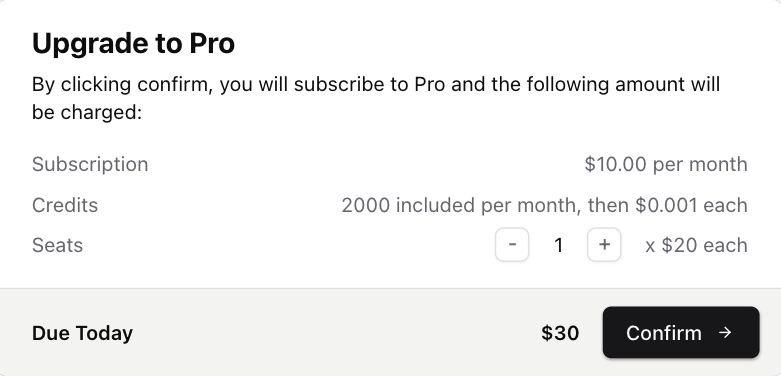
A users first payment will happen via a Stripe hosted Checkout URL. After that, you can configure the Payment Confirmation dialog to open when a customer wants to make another payment (eg upgrades, downgrades, topups). This component allows you to let your customers preview how much will be charged, and confirm the change. Product Change Dialog React
import { CheckoutDialog } from "autumn-js/react";
shadcn/ui
npx shadcn@latest add https://ui.useautumn.com/checkout-dialog
This will download the checkout-dialog component in your /components directory, under a /autumn folder.

Usage

Pass in the checkout-dialog component to the checkout() hook. This allows Autumn to automatically open the checkout dialog when they want to change their active product. The dialog will open if:
  • The customer needs to input a quantity for their purchase (ie, if the product has prepaid prices)
  • If the customer’s payment method is already on file (ie, for upgrades, downgrades or add-ons).
When the customer confirms the purchase, Autumn will attach the product to the customer.
If there are no inputs required and it’s a new customer (without an existing payment method), the customer will be redirected straight to the Stripe checkout page.
import CheckoutDialog from "@/components/autumn/checkout-dialog";
// or import { CheckoutDialog } from "autumn-js/react";
import { useCustomer } from "autumn-js/react";

const { checkout } = useCustomer();

<Button
  onClick={async () =>
    await checkout({
      productId: "pro",
      dialog: CheckoutDialog,
    })
  }
/>;

Scenarios

When you install checkout-dialog, a @/lib/autumn/checkout-content.tsx file is also installed. This file contains the dialog texts for each scenario (returned from the checkout function), which you can customize how you want.
/lib/autumn/get-checkout-content.tsx
import { CheckProductPreview } from "autumn-js";

export const getAttachContent = (preview: CheckProductPreview) => {
  const {
    scenario,
    product_name,
    recurring,
    current_product_name,
    next_cycle_at,
  } = preview;

  const nextCycleAtStr = next_cycle_at
    ? new Date(next_cycle_at).toLocaleDateString()
    : undefined;

  switch (scenario) {
    case "scheduled":
      return {
        title: <p>Scheduled product already exists</p>,
        message: <p>You already have this product scheduled to start soon.</p>,
      };

    case "active":
      return {
        title: <p>Product already active</p>,
        message: <p>You are already subscribed to this product.</p>,
      };

    case "new":
      if (recurring) {
        return {
          title: <p>Subscribe to {product_name}</p>,
          message: (
            <p>
              By clicking confirm, you will be subscribed to {product_name} and
              your card will be charged immediately.
            </p>
          ),
        };
      } else {
        return {
          title: <p>Purchase {product_name}</p>,
          message: (
            <p>
              By clicking confirm, you will purchase {product_name} and your
              card will be charged immedaitely.
            </p>
          ),
        };
      }

    case "renew":
      return {
        title: <p>Renew</p>,
        message: (
          <p>
            By clicking confirm, you will renew your subscription to{" "}
            {product_name}.
          </p>
        ),
      };

    case "upgrade":
      return {
        title: <p>Upgrade to {product_name}</p>,
        message: (
          <p>
            By clicking confirm, you will upgrade your subscription to{" "}
            {product_name} and your card will be charged immediately.
          </p>
        ),
      };

    case "downgrade":
      return {
        title: <p>Downgrade to {product_name}</p>,
        message: (
          <p>
            By clicking confirm, your current subscription to{" "}
            {current_product_name} will be cancelled and a new subscription to{" "}
            {product_name} will begin on {nextCycleAtStr}.
          </p>
        ),
      };

    case "cancel":
      return {
        title: <p>Cancel</p>,
        message: (
          <p>
            By clicking confirm, your subscription to {current_product_name}{" "}
            will end on {nextCycleAtStr}.
          </p>
        ),
      };

    default:
      return {
        title: <p>Change Subscription</p>,
        message: <p>You are about to change your subscription.</p>,
      };
  }
};

Build your own

Typically when charging a customer’s card, you’ll want to display the payment information beforehand for the user to confirm. This is useful for upgrade, downgrade and add-on payment flows. The checkout function will return the data your customer will want to see, such as price information, billing cycle, etc.
If the customer’s payment details aren’t on file (eg, its a new payment), checkout will return a payment URL.
import { useCustomer } from "autumn-js/react";

const { checkout } = useCustomer();

const { data, error } = await checkout({
  productId: "pro",
});
{
    "customer_id": "user_1234",
    "code": "product_found",
    "product_id": "ultra",
    "allowed": false,
    "preview": {
        "title": "Upgrade to Ultra",
        "message": "By clicking confirm, you will upgrade your plan to Ultra and the following amount will be charged to your card immediately:",
        "scenario": "upgrade",
        "product_id": "ultra",
        "product_name": "Ultra",
        "recurring": true,
        "next_cycle_at": 1750604867000,
        "current_product_name": "Pro",
        "items": [
            {
                "price": "-$3.53",
                "description": "Unused time on Pro after 31 May 2025"
            },
            {
                "price": "$7.06",
                "description": "Remaining time on Ultra after 31 May 2025"
            }
        ],
        "options": [
            {
                "feature_id": "seats",
                "feature_name": "seats",
                "billing_units": 1,
                "included_usage": 0,
                "price": 4
            }
        ],
        "due_today": {
            "price": 3.53,
            "currency": "USD"
        },
        "due_next_cycle": {
            "price": 10,
            "currency": "USD"
        },
        "product": {
            "id": "ultra",
            "name": "Ultra",
            "group": null,
            "env": "sandbox",
            "is_add_on": false,
            "is_default": false,
            "version": 1,
            "created_at": 1747926427301,
            "items": [
                {
                    "type": "price",
                    "feature_id": null,
                    "interval": "month",
                    "price": 10
                },
                {
                    "type": "priced_feature",
                    "feature_id": "seats",
                    "feature_type": "continuous_use",
                    "included_usage": 0,
                    "interval": "month",
                    "price": null,
                    "tiers": [
                        {
                            "to": "inf",
                            "amount": 4
                        }
                    ],
                    "usage_model": "prepaid",
                    "billing_units": 1,
                    "reset_usage_when_enabled": true
                },
                {
                    "type": "feature",
                    "feature_id": "chat_messages",
                    "feature_type": "single_use",
                    "included_usage": 20,
                    "interval": "month",
                    "reset_usage_when_enabled": true
                }
            ],
            "free_trial": null
        }
    }
}
The preview object that is returned from the checkout function can be used to display the data you want to the user. Example implementation:
React
import { useCustomer } from "autumn-js/react";

export default function PurchaseButton() {
  const { checkout, attach } = useCustomer();

  return (
    <button
      onClick={async () => {
        const { data } = await checkout({
          productId: "ultra",
        });

        //throw a browser popup if no checkout URL
        if (!data?.url && window.confirm(data.preview.scenario)) {
          await attach({
            productId: "ultra",
          });
        }
      }}
    >
      Upgrade to Ulta
    </button>
  );
}
If preview is returned, it will contain a scenario enum. You can use this to control the messaging you display to the user. See our shadcn/ui dialog messaging for an example.
ScenarioDescription
upgradeThe customer is upgrading their product
downgradeThe customer is downgrading to another paid tier
cancelThe customer is downgrading to a free product
renewThe customer is reactivating a product that was previously cancelled
scheduledThe product is already scheduled to start at a future date (eg, for downgrades), so no changes are needed
activeThe customer already has the product active, so no changes are needed