

- GitHub Actions
- GitLab CI
- Google Cloud (Cloud Run, Compute Engine, GKE, Cloud Functions)
- AWS (ECS, Lambda, EC2 and anything else that runs as an IAM role)
- Azure managed identities
- Vercel
- Kubernetes on EKS, GKE and AKS
- Any other issuer that publishes OIDC discovery
How it works
- You add a trust rule in the dashboard. It names the platform and the exact workload, like a GitHub repository ID or an IAM role ARN.
- At runtime, the workload asks its platform for an OIDC token issued for your Autumn audience.
- The workload sends that token to
/v1/auth.exchange_token. Autumn fetches the issuer’s public keys, checks the signature, expiry and audience, and looks for a rule that matches. - Autumn returns an access token starting with
am_wit_. Use it as a Bearer token until it expires, then exchange again.
Your audience
Every environment has its own audience:AUTUMN_AUDIENCE variable.
The workload asks its platform for a token with this audience. Azure is the exception: its tokens carry your own app registration as the audience, so Azure workloads send the Autumn audience in the exchange request instead. See Azure.
Create a trust rule
Open Settings → Workload Identity in the environment you want the workload to use, and click Add trust rule.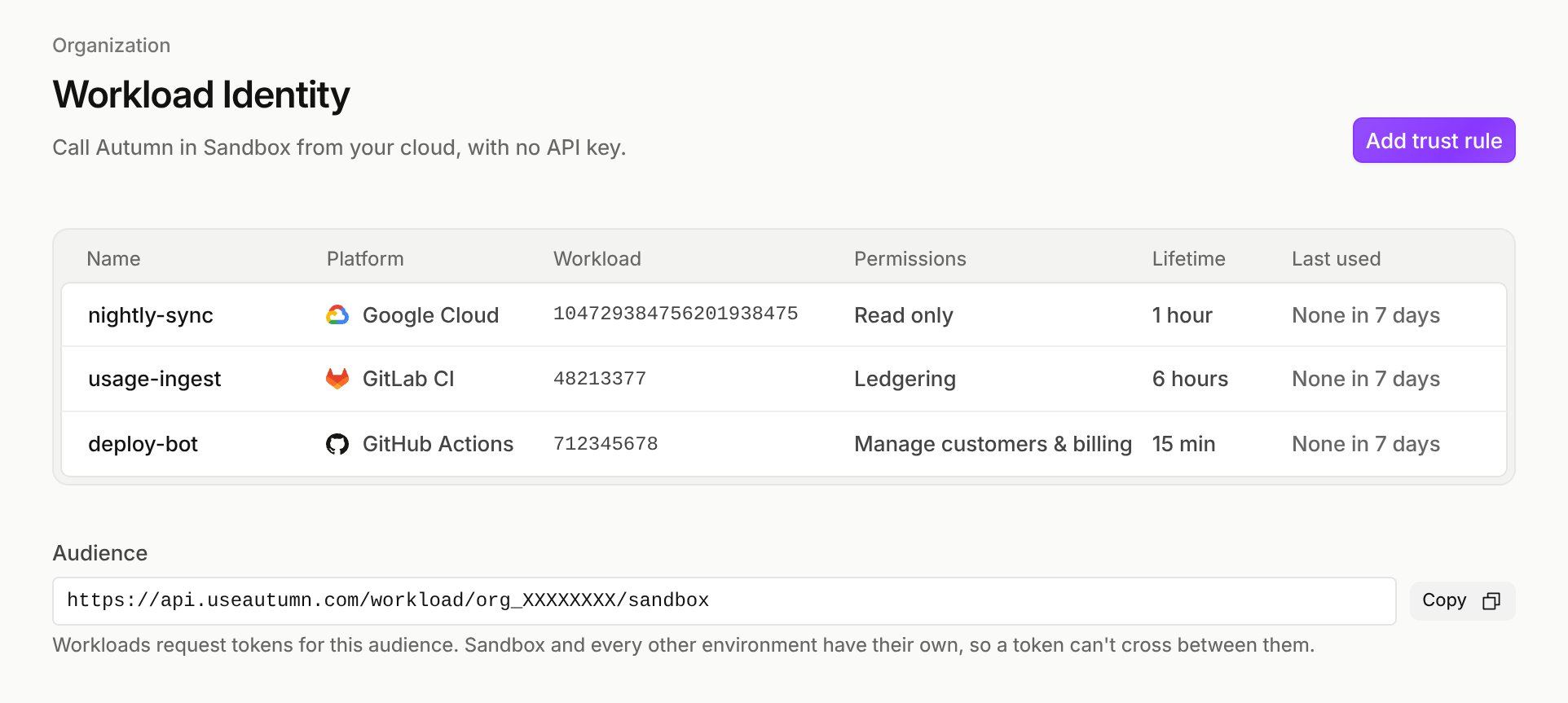
1
Pick where it runs
Choose the platform. This decides which issuer Autumn trusts and which claim identifies the workload.
2
Identify the workload
Paste the workload’s ID, like a repository ID or an IAM role ARN, and the issuer if the platform needs one. Each platform pins a claim that can’t be reused by someone else: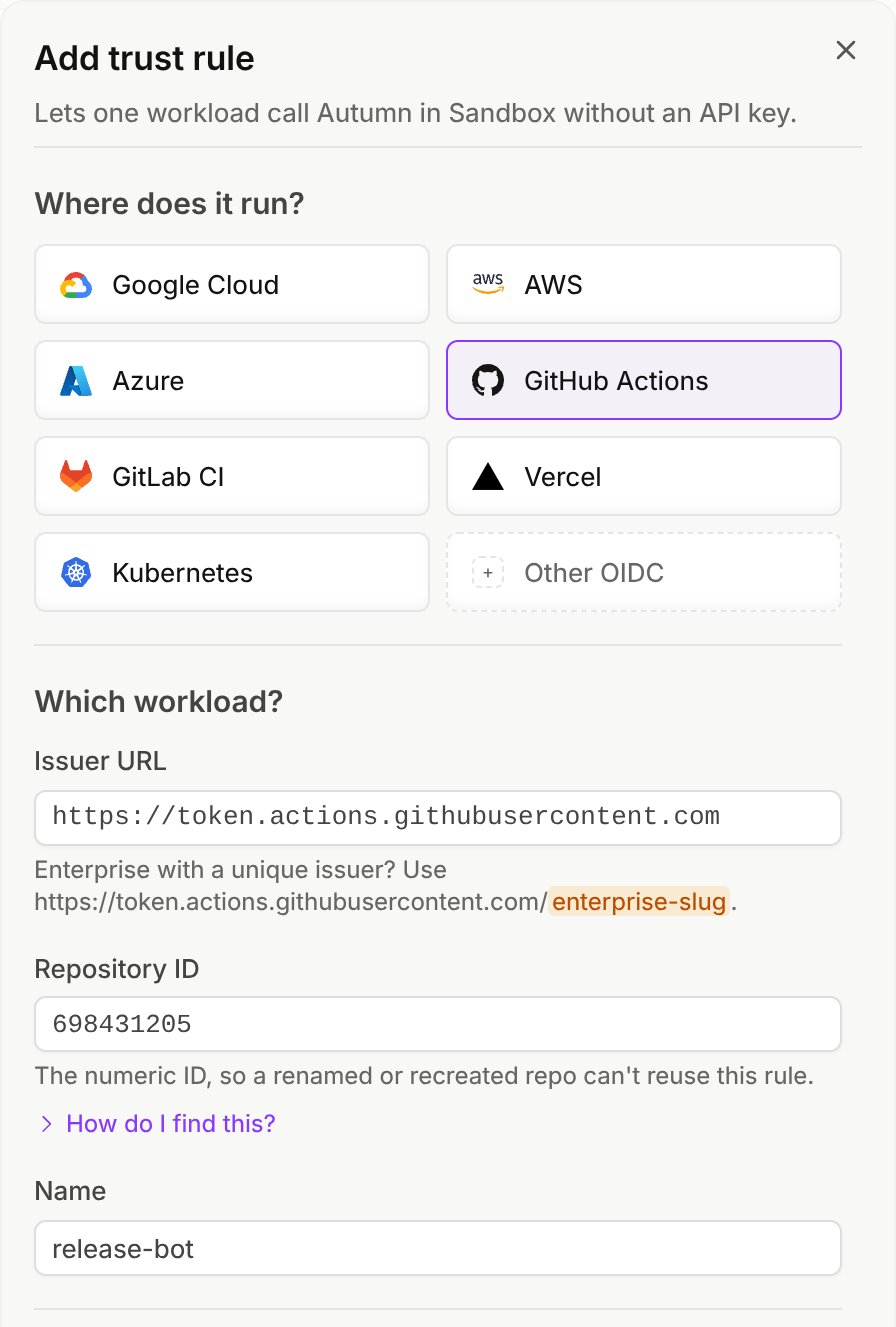
The value has to match exactly. Wildcards aren’t supported. Use conditions to narrow a rule further.
3
Add conditions (optional)
Under Only when, limit the rule to some runs of the workload, like production deploys from
main. See Conditions.4
Choose permissions and lifetime
Pick what the workload can do and how long each access token lasts. See Permissions and lifetime.
<issuer>/.well-known/openid-configuration when you save, so the issuer has to be a public HTTPS URL.
Set up your platform
Each section shows how to get a platform token for your audience and what to put in the rule. They all end with the same exchange request.GitHub Actions
Rule: the repository ID. Find it withgh api repos/<owner>/<repo> --jq .id. The issuer is https://token.actions.githubusercontent.com. If your enterprise uses a unique issuer, use https://token.actions.githubusercontent.com/<enterprise-slug>.
The job needs id-token: write permission to request a token:
.github/workflows/sync.yml
main, add the conditions environment is production and ref is refs/heads/main.
GitLab CI
Rule: the project ID, from the project’s overview page under ⋮ → Copy project ID. Autumn matches it against thejob_project_id claim, which needs GitLab 18.4 or later. The issuer is https://gitlab.com. On a self-managed instance, use your instance URL, like https://gitlab.example.com. It has to be reachable from the internet over HTTPS.
Request the token with id_tokens:
.gitlab-ci.yml
ref_protected is true, environment is production or ref is main.
Google Cloud
Rule: the service account’s numeric unique ID, not its email:https://accounts.google.com.
On Cloud Run, Compute Engine, Cloud Functions and GKE with Workload Identity Federation for GKE, ask the metadata server for an identity token:
AWS
AWS signs tokens for external services through IAM outbound identity federation.-
Turn it on once per account:
-
Read your account’s issuer and paste it into the rule:
-
Allow the workload’s role to request tokens for your audience:
-
Request a token from a regional STS endpoint. The global endpoint doesn’t serve this API:
arn:aws:iam::123456789012:role/usage-worker. Find it with aws iam get-role --role-name usage-worker --query Role.Arn --output text. If several workloads share a role, give this one its own role first.
Azure
Azure managed identities can only get tokens for an app registration in your tenant, so the setup has an extra step.-
In Microsoft Entra ID → App registrations, create a registration, for example
autumn-workloads, with no redirect URI. -
Open Expose an API, click Add next to Application ID URI, and save the suggested
api://<app-id>. - In the rule, set Audience to that URI. If your tokens carry the app’s client ID instead (always the case for v2 tokens), use the client ID.
-
Set Workload to the managed identity’s object (principal) ID:
-
Set the issuer to match the token’s
issclaim. Tokens are v1 unless the app registration’s manifest setsrequestedAccessTokenVersionto 2:
&client_id=<identity-client-id> to either URL.
The token’s audience is your app, not Autumn, so send your Autumn audience as the audience parameter when you exchange it. That tells Autumn which organization and environment to check.
Vercel
- Make sure OIDC federation is on for the project, under Project → Settings → Security.
- Rule: the issuer is
https://oidc.vercel.com/<team-slug>and the workload is the project ID (prj_...) from Project → Settings → General. Renaming the team changes the issuer, so update the rule if you do.
https://vercel.com/<team-slug>, which Autumn rejects. Request your Autumn audience with @vercel/oidc 4.0 or later:
app/api/sync/route.ts
environment is production.
Kubernetes
The kubelet can mount a service account token with your Autumn audience into the pod. The default mounted token is for the Kubernetes API, so Autumn rejects it. Rule: the issuer is your cluster’s OIDC issuer and the workload issystem:serviceaccount:<namespace>:<name>.
The issuer has to be reachable from the internet over HTTPS. AKS clusters before 1.34 need
--enable-oidc-issuer.
Mount the token with a projected volume:
deployment.yaml
/var/run/secrets/autumn/token each time you exchange. The kubelet rotates the file before the token expires, so a copy read at startup goes stale.
Pods without a service account run as the namespace’s default account, which every pod there shares. Create a dedicated one. To stop a deleted and recreated account with the same name from matching, add the condition kubernetes.io › serviceaccount › uid is the account’s UID:
Other OIDC issuers
Choose Other OIDC for any issuer that publishes/.well-known/openid-configuration and a JWKS over public HTTPS. The rule matches the token’s sub claim exactly. Tokens must be signed with an asymmetric algorithm (RS, PS or ES families, or EdDSA) and include exp and iat.
Exchange the token
Send the platform token toPOST https://api.useautumn.com/v1/auth.exchange_token. No API key is needed. The endpoint follows RFC 8693 and accepts a form body or JSON.
expires_in is in seconds and comes from the rule’s lifetime. scope lists the scopes the matching rule grants, separated by spaces.
The exchange is stateless. You can exchange the same platform token as many times as you like until it expires, so there’s nothing to coordinate between replicas.
Call Autumn with the token
Use the access token anywhere you’d use a secret key:expires_in runs out, or when a call returns 401.
Conditions
Conditions narrow a rule to some runs of a workload. Every condition has to match, on top of the issuer and workload ID. They can only make a rule stricter.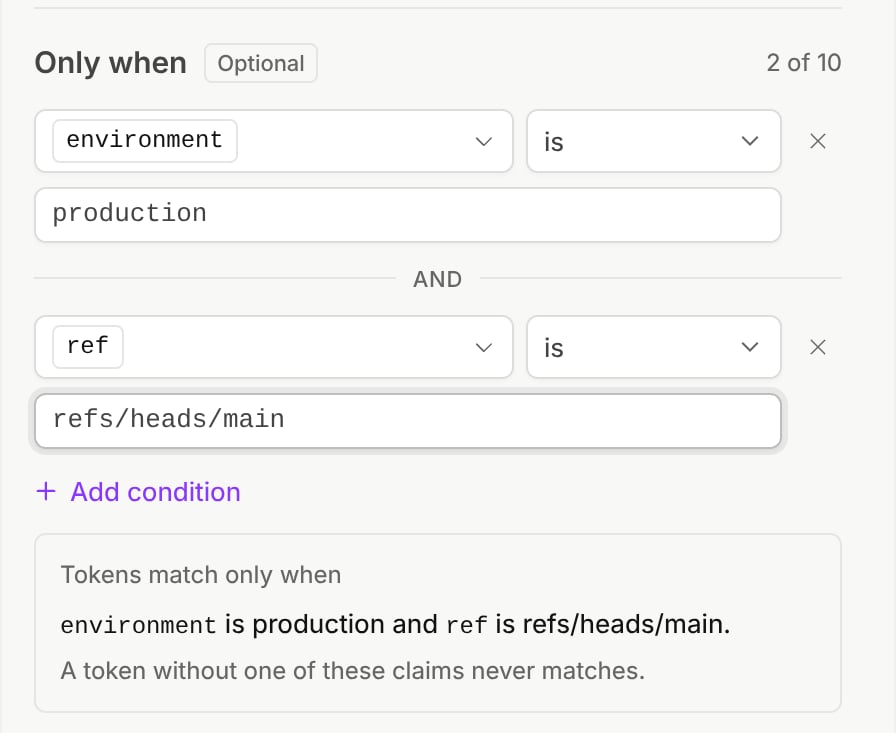
- A claim that’s missing from the token never matches, not even is not. A condition can’t pass because a claim is absent.
- Nested claims are a list of keys, shown as
kubernetes.io › serviceaccount › uid. Dots inside a key stay part of that key. - Numbers and booleans are compared as text, so
ref_protectedistrueworks. - A rule can have up to 10 conditions.
Permissions and lifetime
Pick a preset, or click Edit to choose exact scopes:
A rule can’t grant scopes you don’t have yourself.
The lifetime is how long each access token lasts: 15 minutes, 1 hour, 6 hours or 12 hours. Shorter is safer. The workload just exchanges again when a token expires.
Edit or revoke a rule
Click a rule to see its details and the exchanges it served in the last 7 days.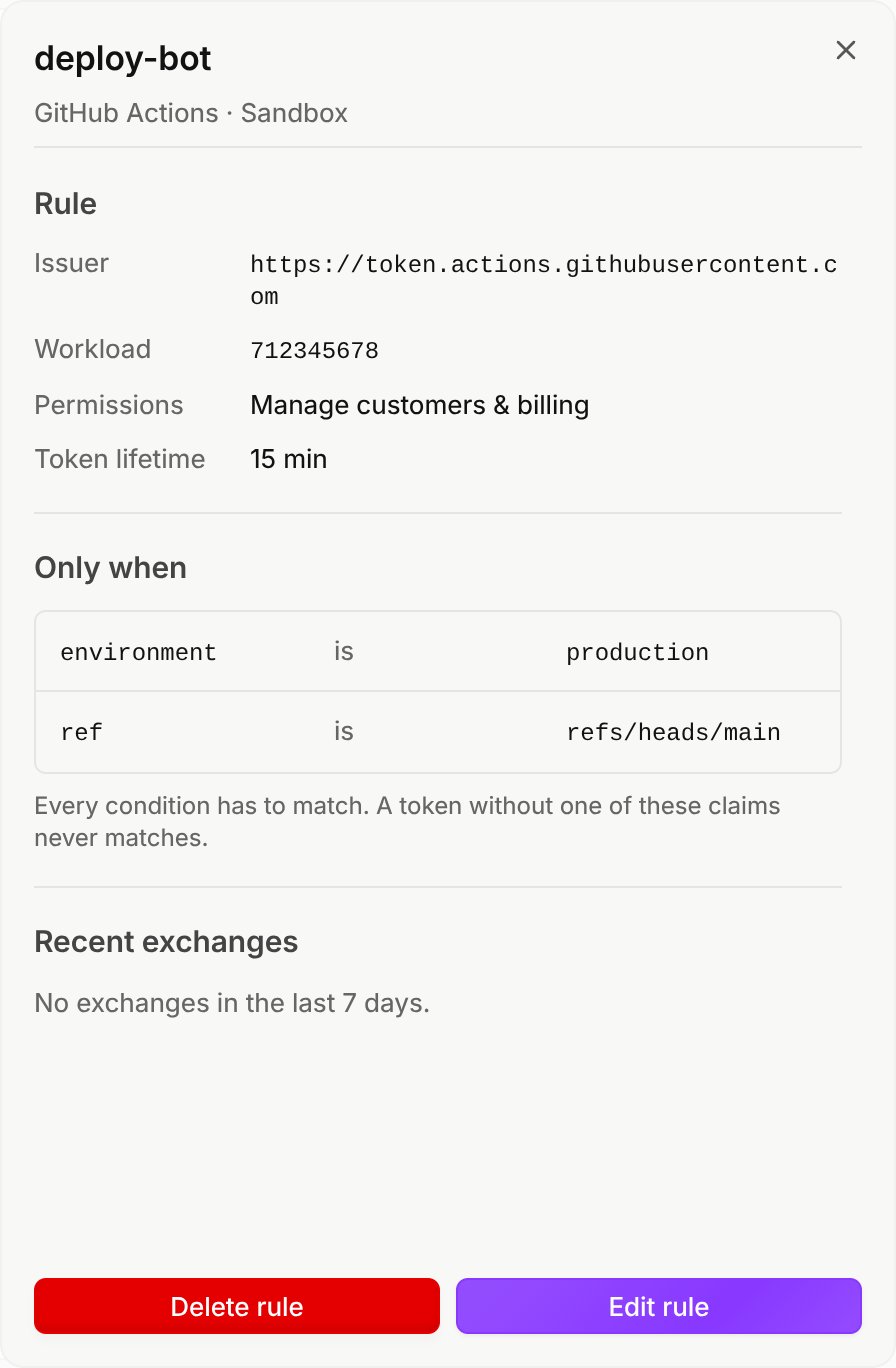
Troubleshooting
A rejected exchange returns 401 with codeinvalid_grant. Read details.reason to see why:
details.reason, not on the message text, which may change.
When you call the API with an access token, two more 401 messages can come back:
- Invalid or expired workload token: the access token has expired or is malformed. Exchange again.
- Workload token revoked: its rule was edited or deleted. Exchange again to get a token under the current rule.
rate_limit_exceeded. A workload only needs to exchange about once per token lifetime, so normal traffic stays well below it.